Appearance
案例: 无界微前端架构搭建案例
视频直播内容: https://community.codewave.163.com/CommunityParent/videodetail?courseid=3285158193822720
微前端集成的必要性
微前端将一个大型、复杂的前端应用拆分成多个独立的子应用,但又保持用户体验的一致性。每个子应用可由独立的团队进行开发,并允许使用不同的技术栈进行开发,也可独立测试和部署。这样可以提高开发速度、降低维护成本,并促进团队之间的协作。
使用微前端架构在 CodeWave 上开发大型应用的好处至少有以下几点:
- 开发体验提升,单个应用专注于某一个业务模块,NASL 节点数量可控
- 应用解藕,业务聚焦,开发效率高,显著降低开发和维护成本
- 扩展性极强,可以低成本的无限扩展子应用
- 集成简单,仅需简单的配置,就能将新的应用集成进系统
- 隔离性好,子应用的上下线,不会对已发布的应用造成影响
- 侵入性小,仅需引入 wujie 框架 和封装的主子应用前端 sdk 即可,其中仅需对链接跳转进行改造即可
背景介绍
本文,将从实际项目出发,介绍一下「教务系统」,如何从传统架构迁移到微前端架构。
说明:本项目采用的是 wujie 微前端框架,其他微前端框架类似
本次架构重构的要求有以下几点:
- 将单体应用拆分为多个应用,方便后续扩展迭代
- 各子应用的公共能力统一由框架层提供
- 所有页面均可在标签页打开,且可以自由配置组合菜单
- 主子应、子子应用间可以无缝跳转引用
应用拆分如下,
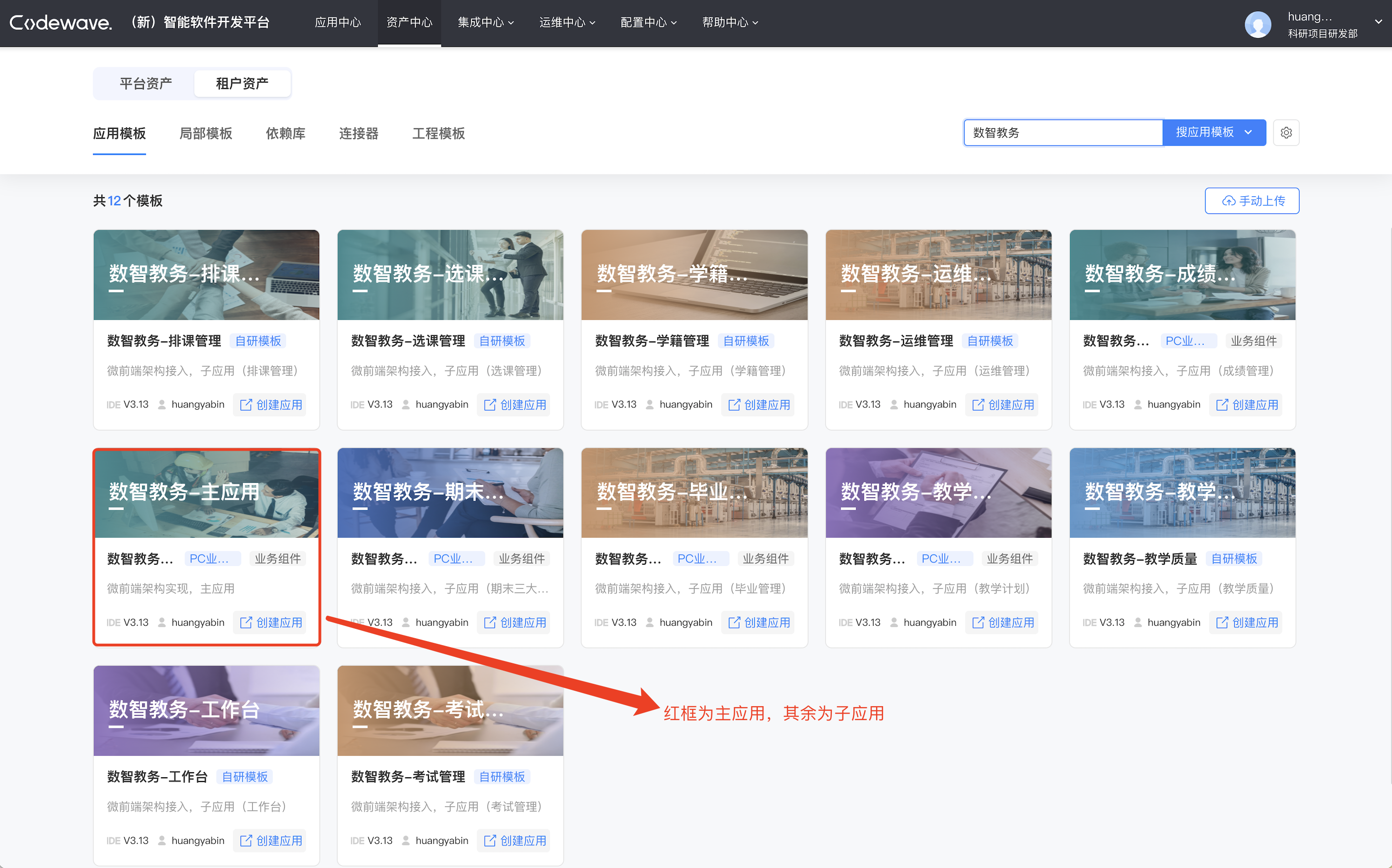
基于以上几点要求,我们有如下设计, 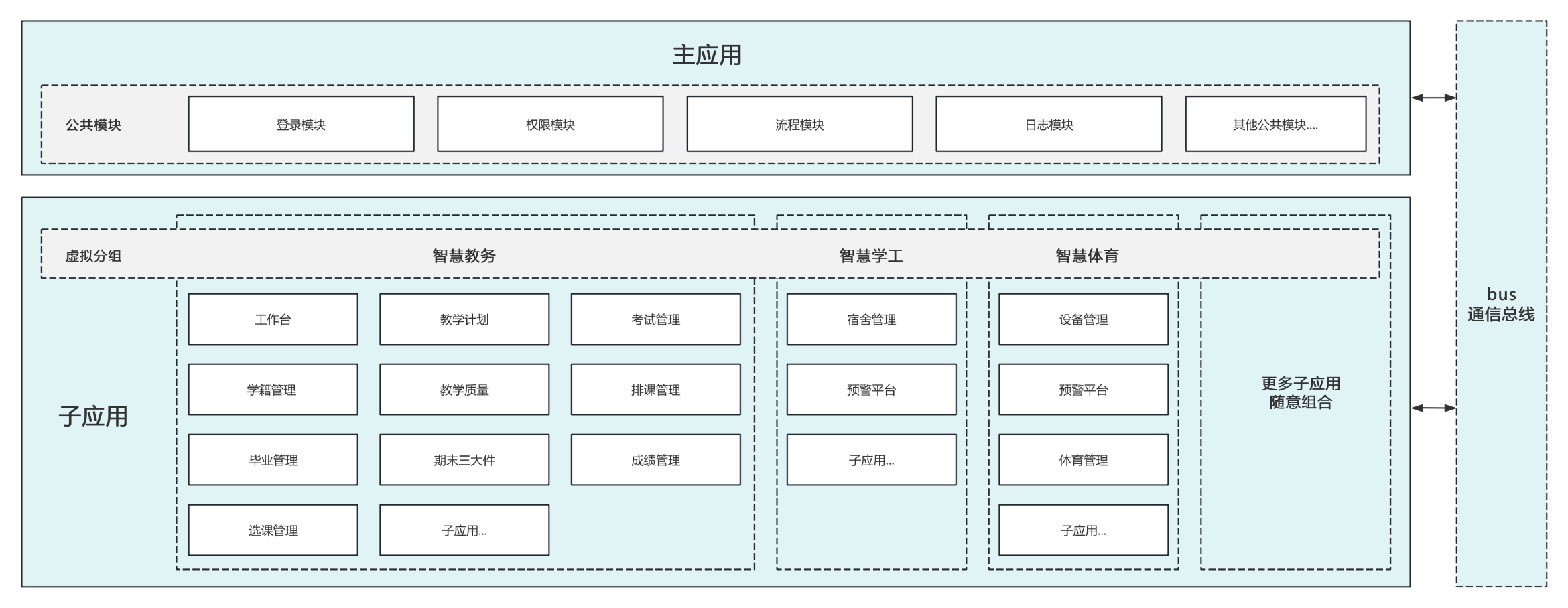
- 主应用
框架的核心实现层,主要包含:应用调度、通信总线、各子应用的公共模块实现等。
- 子应用
框架的业务集成层,主要包含:应用集成、具体的业务实现等。
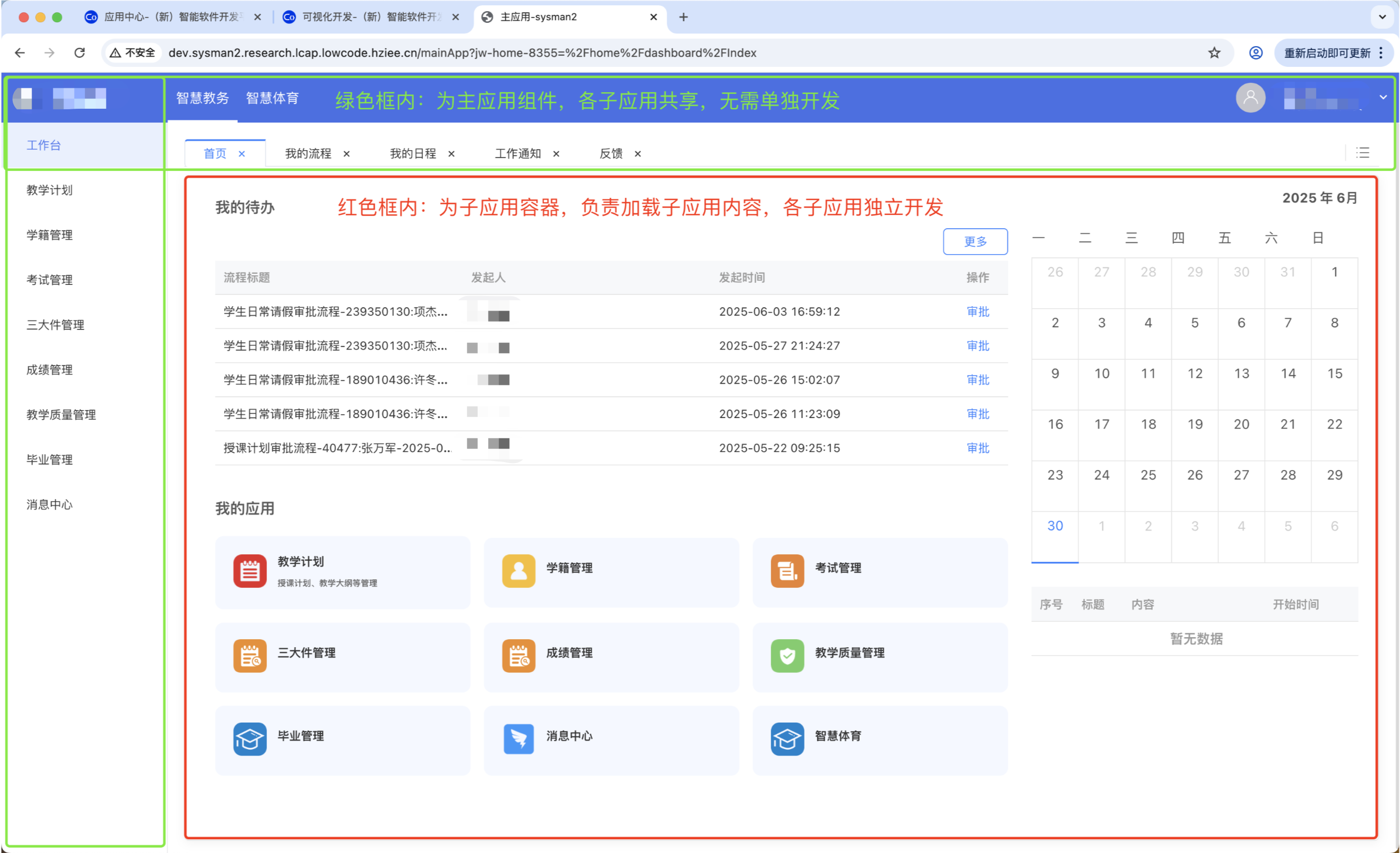
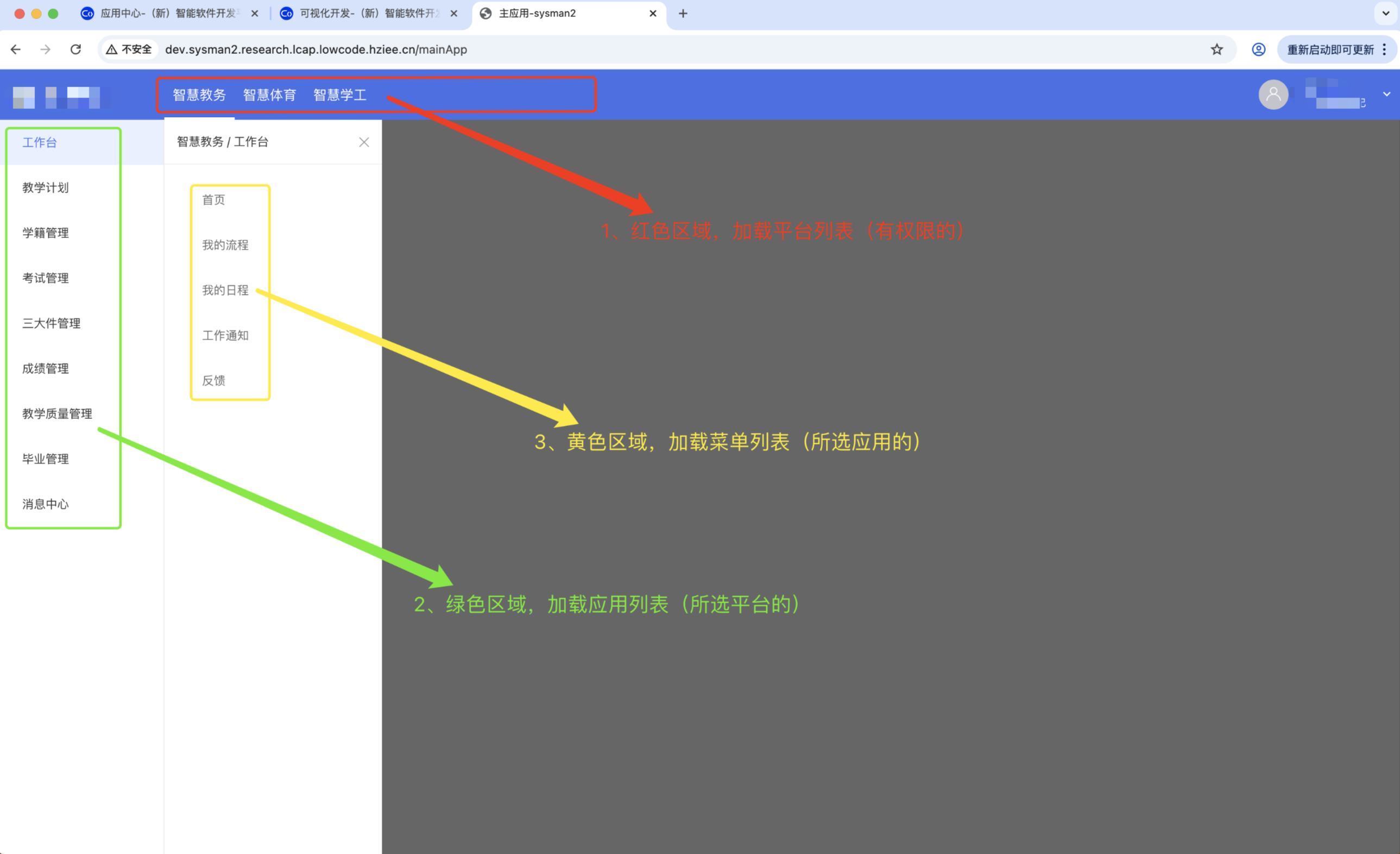
如图,整个界面
- 绿色区块,为主应用公共组件,各子应用共享,无需单独开发
- 红色区块,为子应用容器,负责加载子应用内容,各子应用独立开发
基础数据介绍
在现有的应用 > 菜单层次上,新增了应用分组(平台/系统)的概念。整个数据结构为,平台 > 应用 > 菜单三层级联(platform > subApp > menu,后文皆以这些单词代表其实体)。
路径介绍
由于所有页面都在主应用的应用容器内加载。所以只有一个访问路径
/mainApp,各子应用路由通过 query 参数传递?jw-home-7421=/home/dashboard/processCenter,如图,
txt
路径结构形如,/mainApp?${platform}-${subApp}-${nonce}=${path}

其中 ${platform}-${subApp}-${nonce}=${path} 标识当前打开的子应用页面(kv 结构)
 - ${platform}  平台,如 jw(表示,智慧教务)
 - ${subApp}    子应用,如 home(表示,工作台应用)
 - ${nonce}     随机串,用来支持子应用多开(同时打开同一个子应用的同一个页面,且互相隔离)
 - ${path}      子应用访问路径,如 /home/dashboard/processCenter?param=value...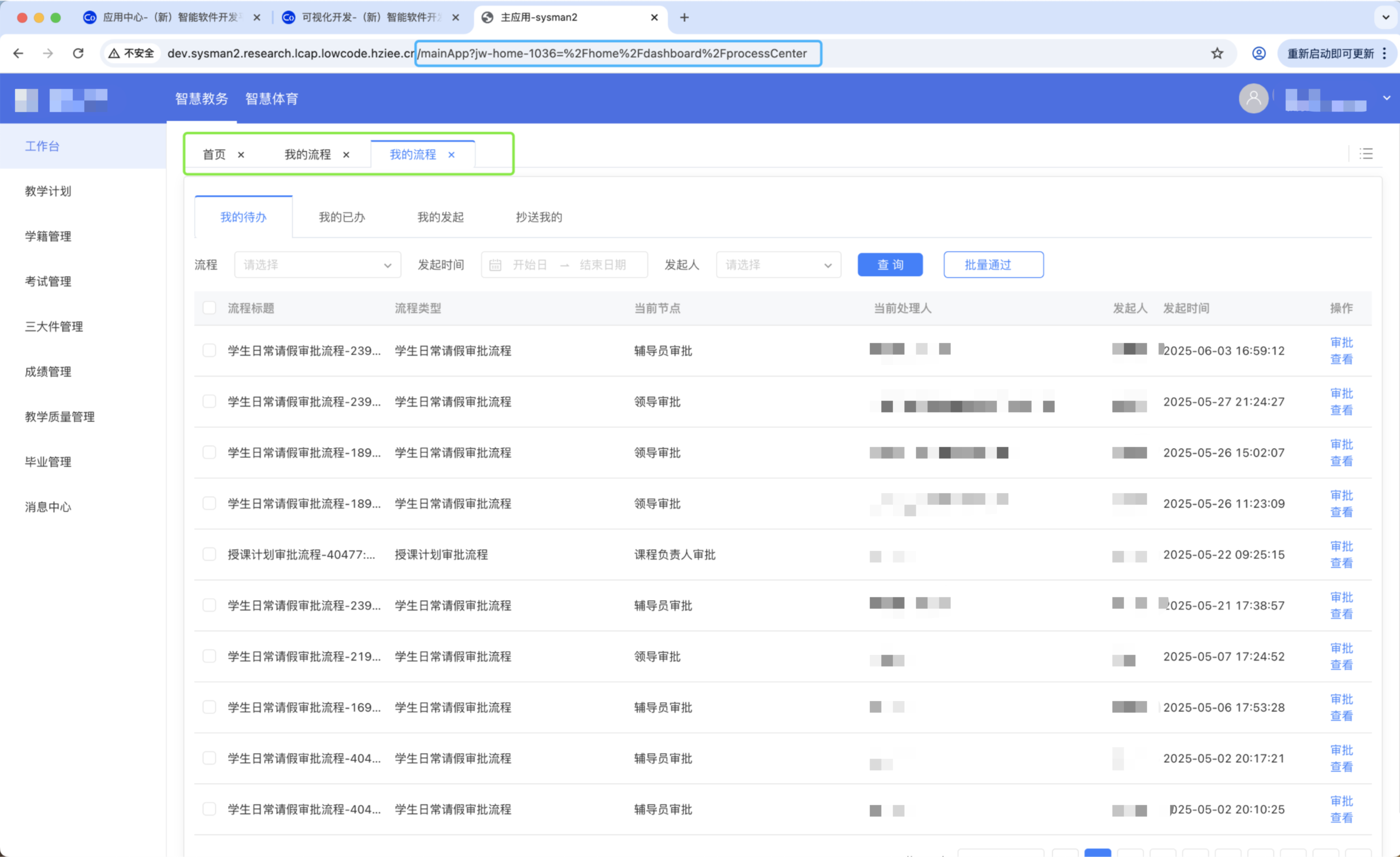
标签页介绍
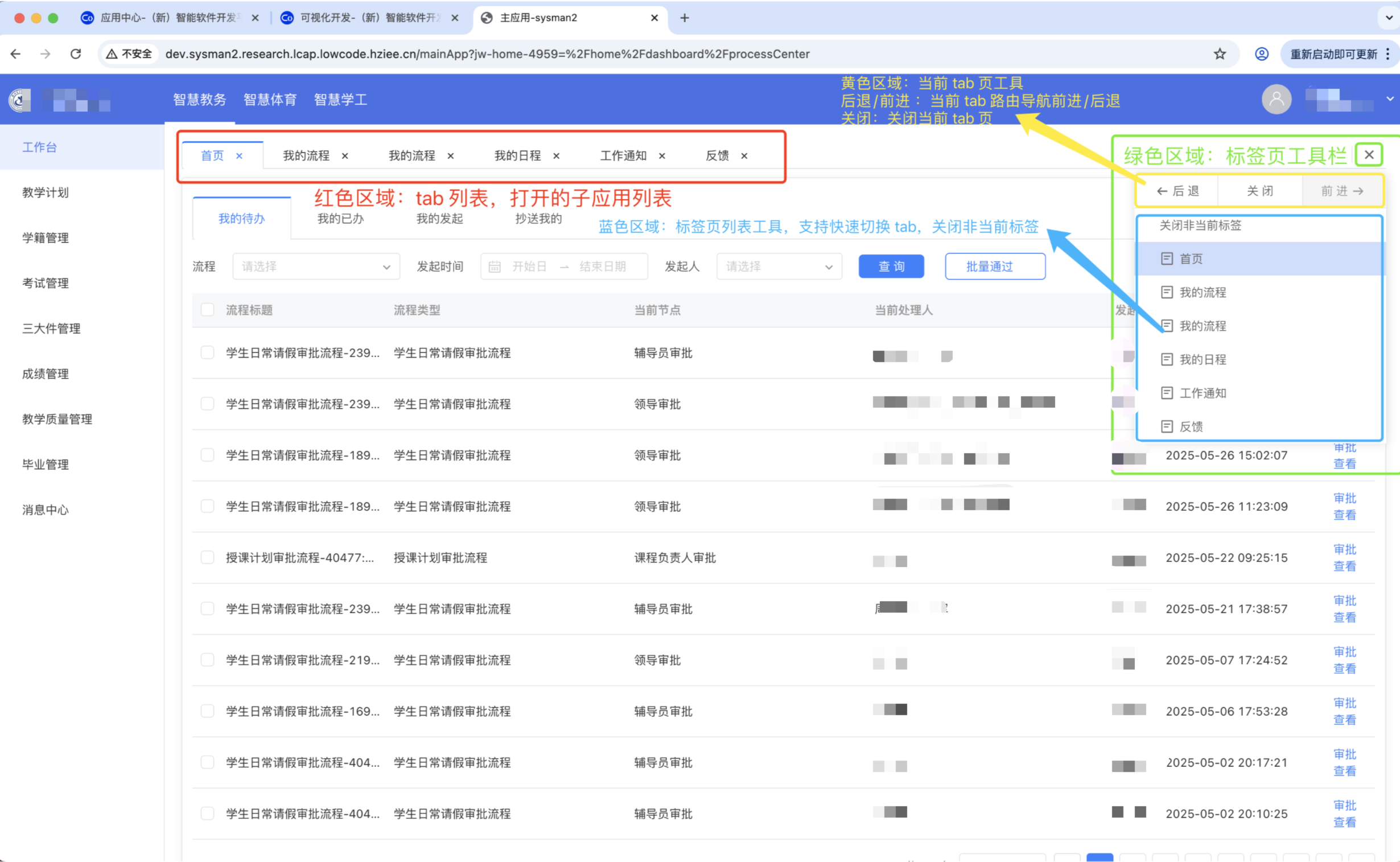
每个 tab 页打开一个子应用,支持应用的多开。同时右上角提供一些导航工具,用来实现 tab 的快速切换和关闭;当前 tab 页内的路由导航等
数据结构设计
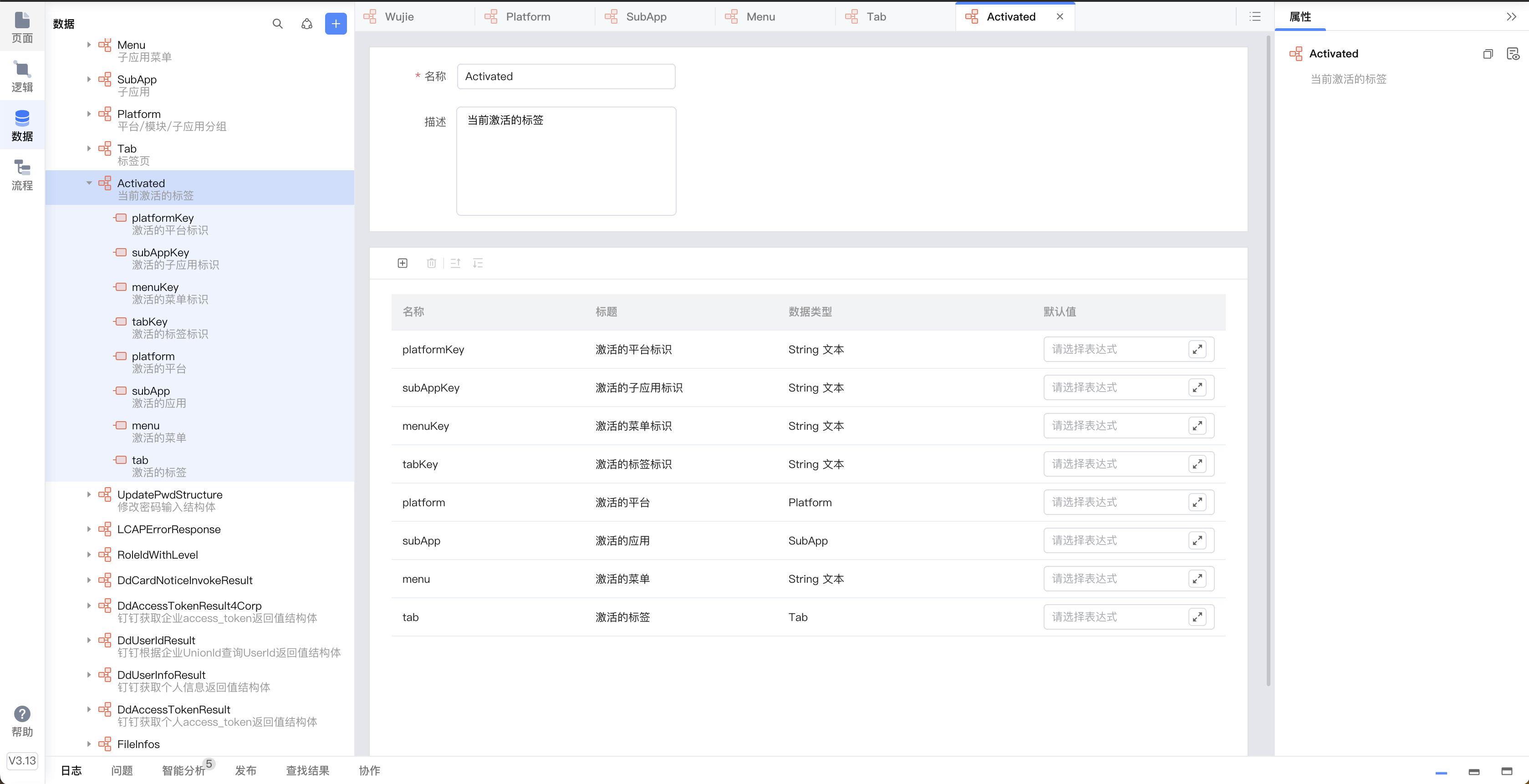
Wujie,应用全局状态
核心数据结构,存储整个主子应用的状态信息
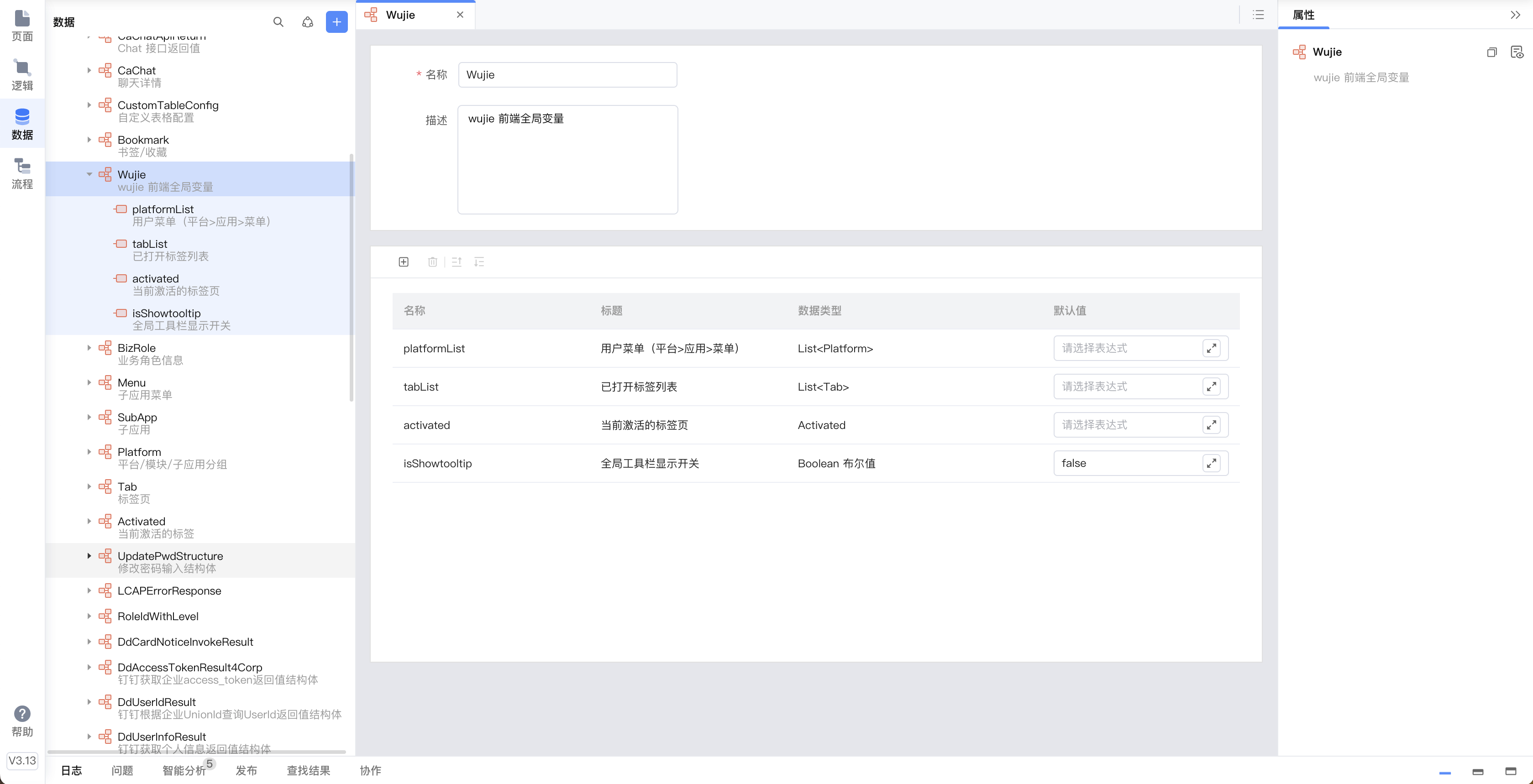
Platform,平台信息(应用分组信息)
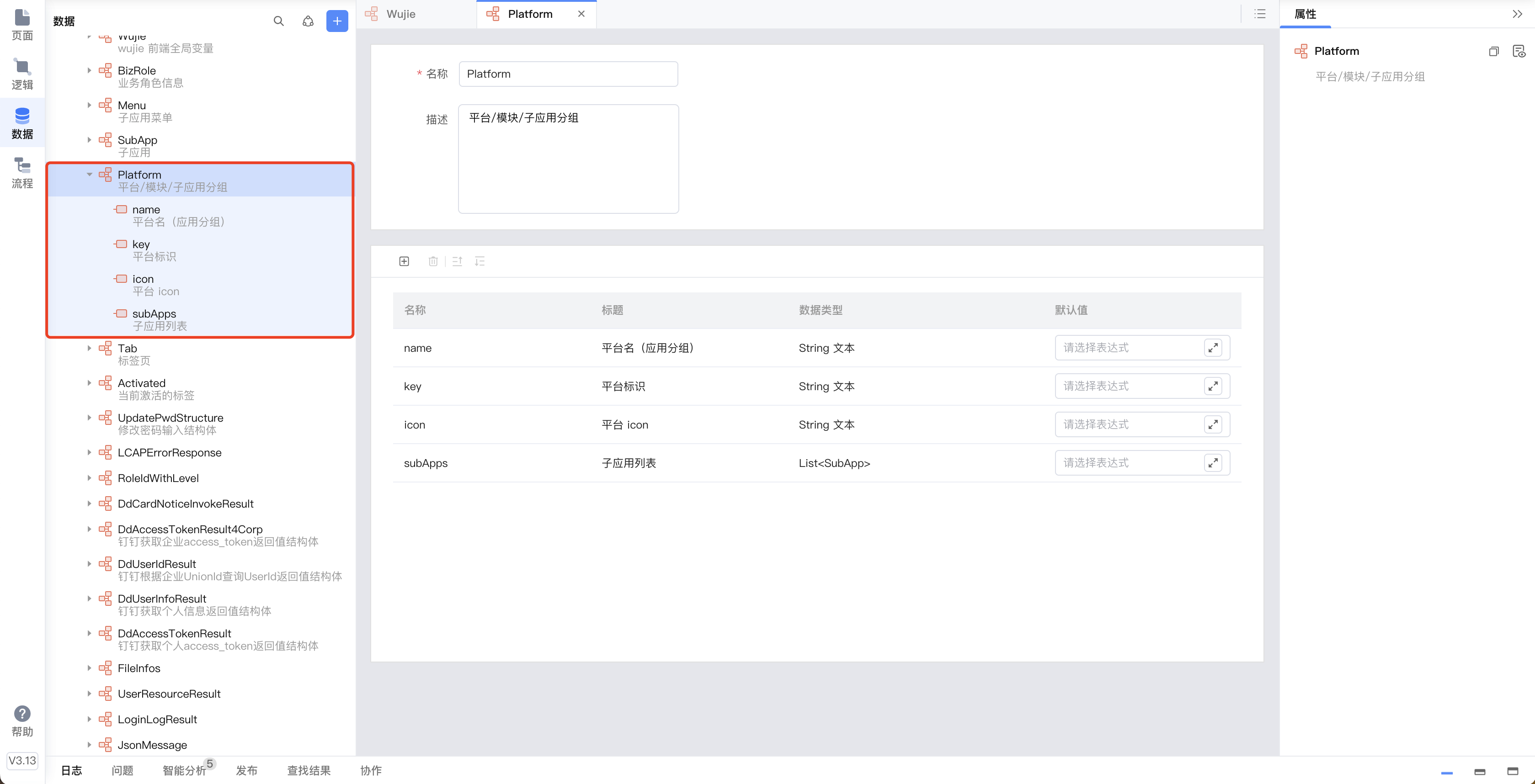
Subapp,子应用信息
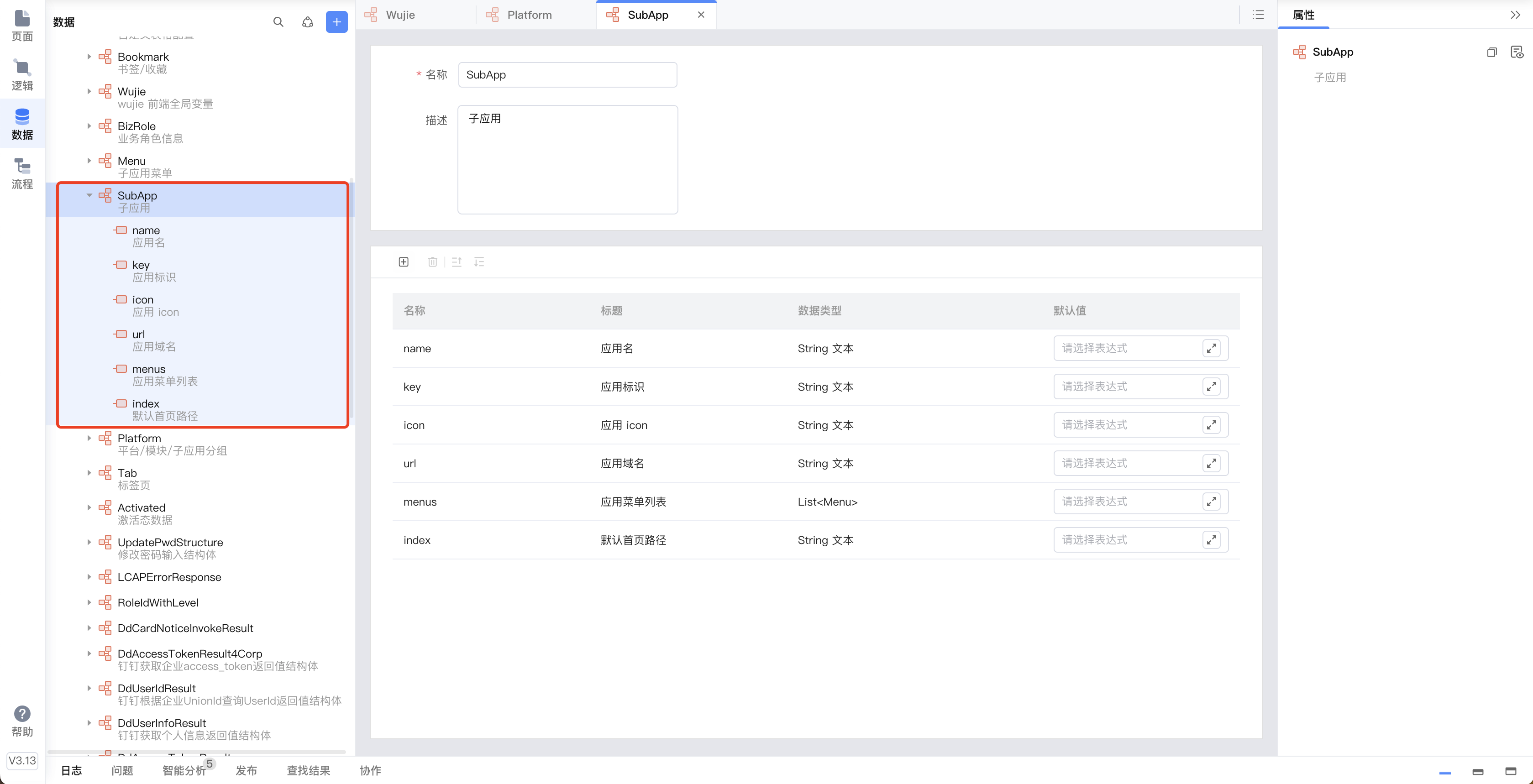
Menu,子应用菜单信息
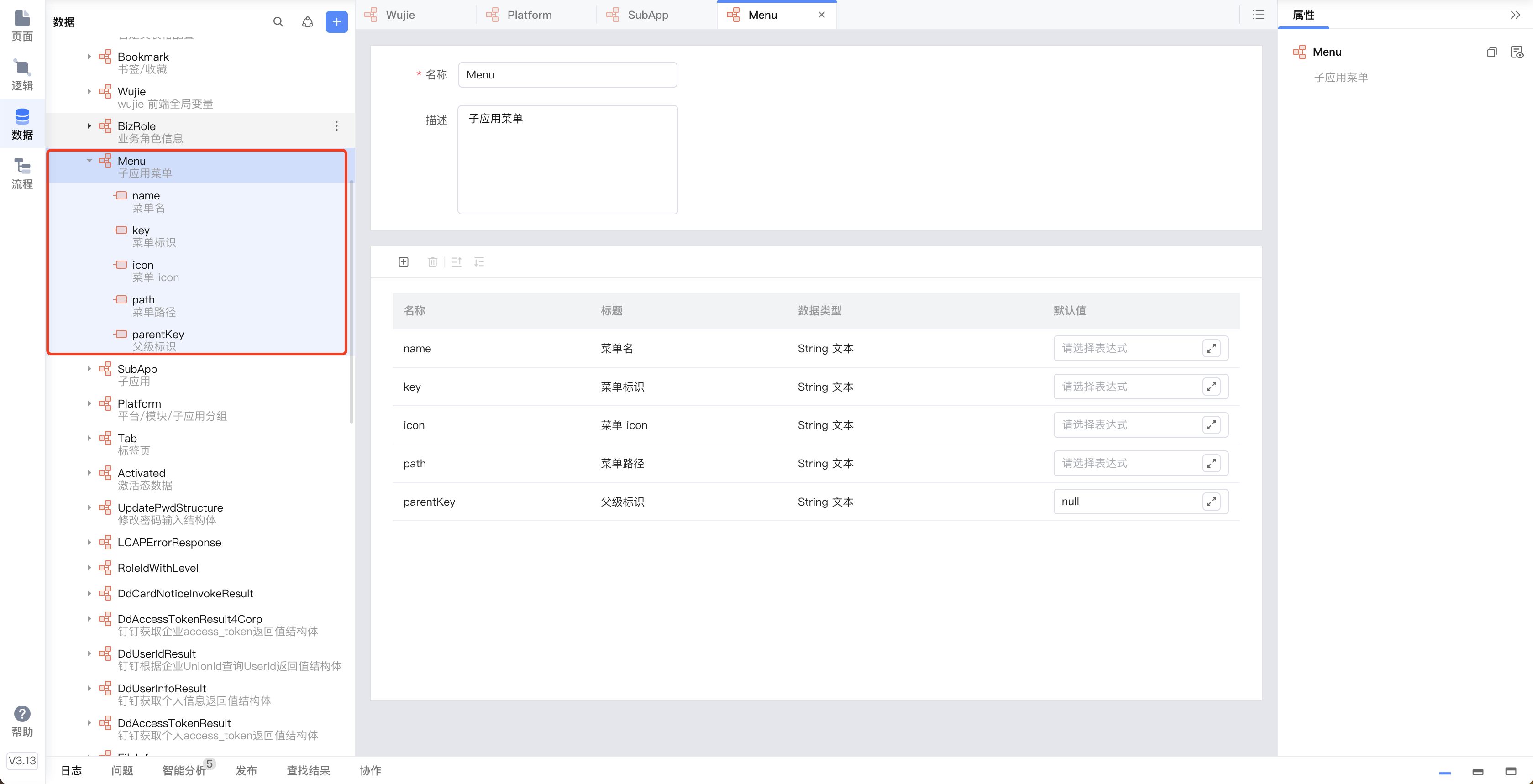
Tab,标签页信息(选项卡标签)
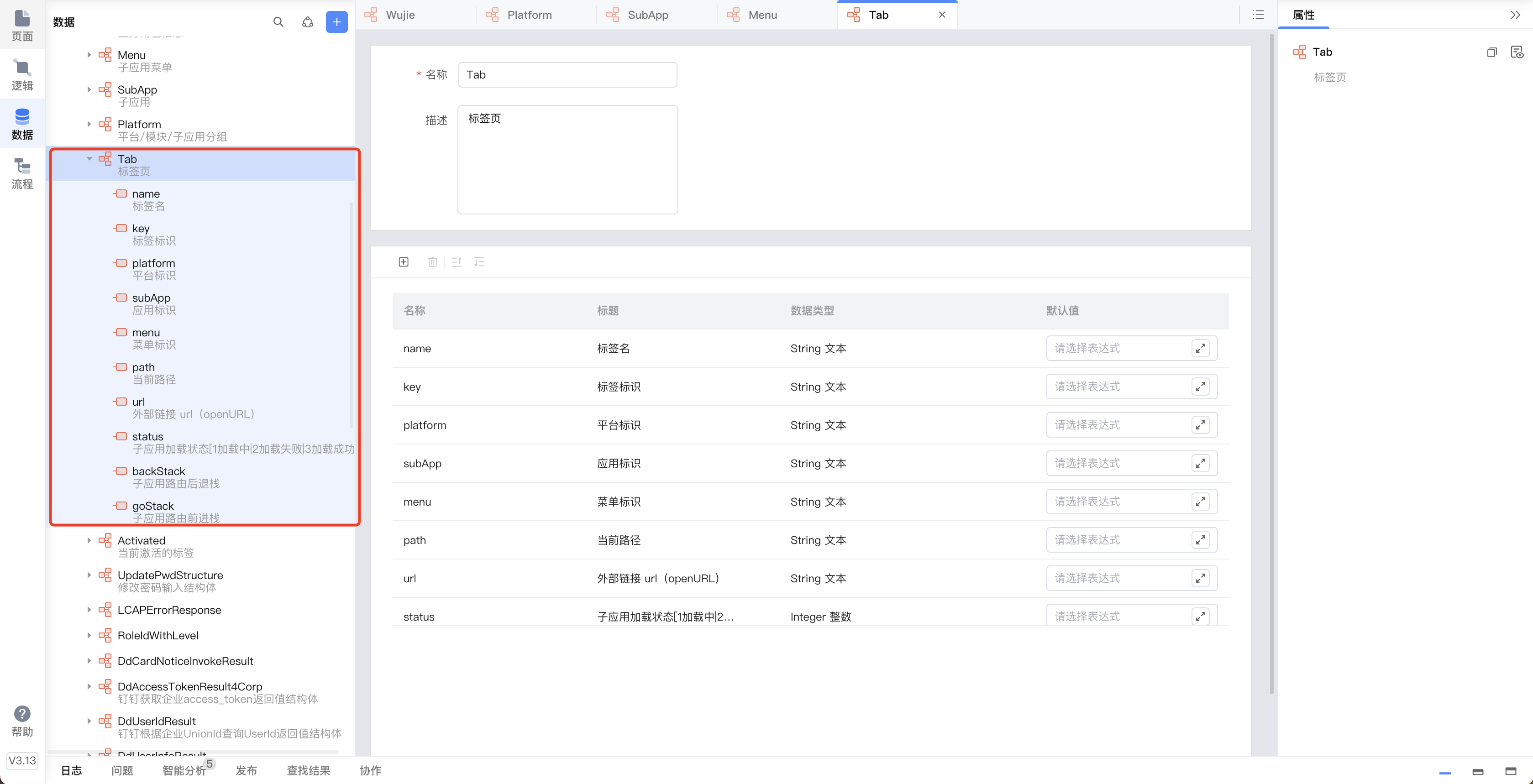
Activated,当前激活的标签页信息
主应用
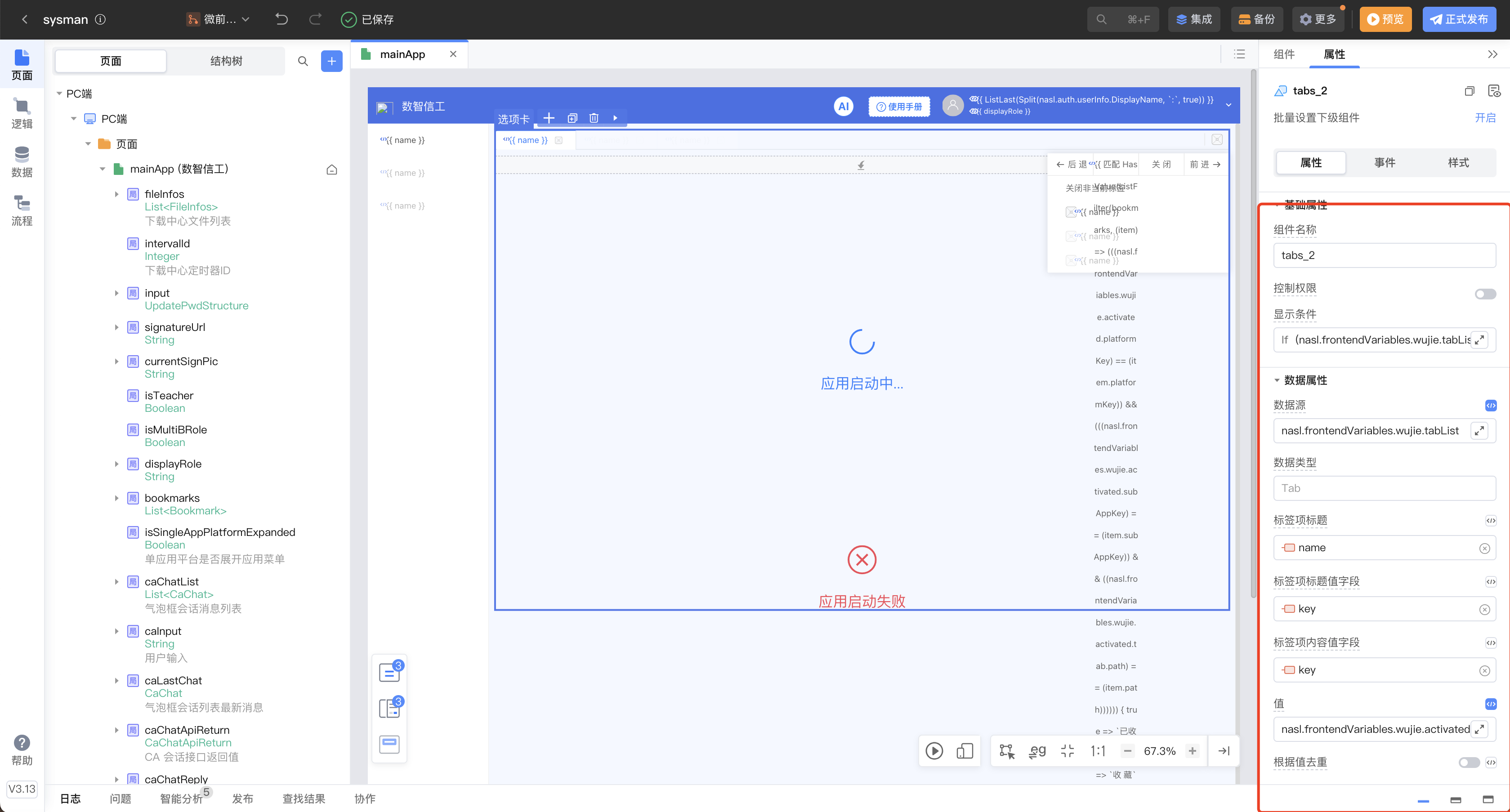
选项卡组件设置
子应用页面均以新开标签页的形式打开,天然的容器隔离互不影响,支持页面重复打开
主应用 SDK 封装
在应用容器页面的「进入页面时」事件中引入如下 js 块,完成主应用的改造
说明:本项目为 mainApp 页面,后续子应用页面都在 mainApp 页面的选项卡内加载
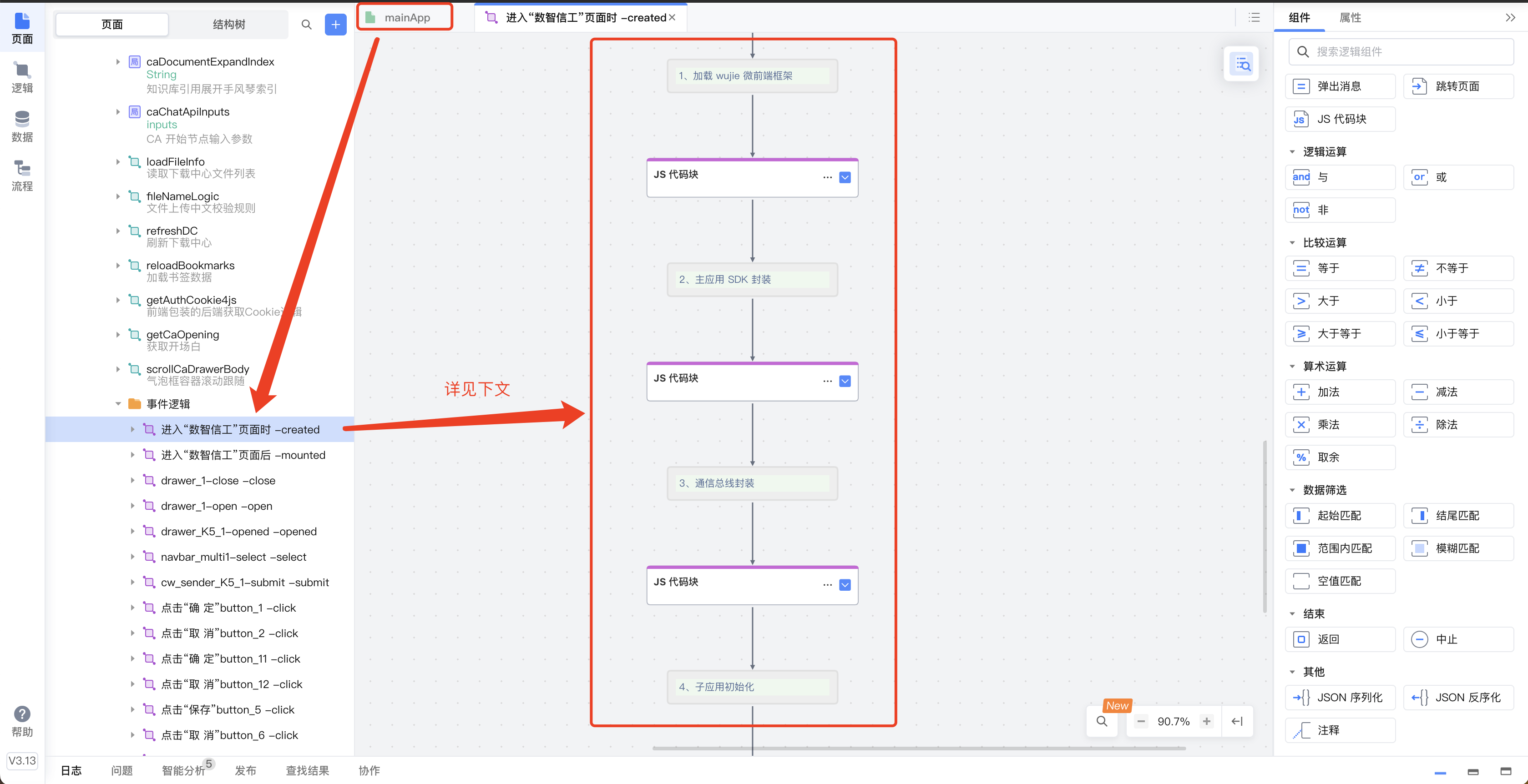
1、加载 wujie 微前端框架
javascript
/**
 * wujie 环境初始化
 */
function loadScript(src) {
    const script = document.createElement('script');
    script.src = src;
    const res = new Promise((res, rej) => {
        script.onload = res;
        script.onerror = rej;
    });
    document.head.appendChild(script);
    return res;
}

const src = 'https://unpkg.com/wujie@1.0.24/lib/index.js';

if (!window.wujie) {
    await loadScript(src);
}
2、主应用 SDK 封装
核心实现,对所有设计进行了封装,提供了一个全局对象
javascript
/**
* wujie 自定义全局对象
*/
const _this = this;
const _utils = this.$utils;
const _fv = this.$global.frontendVariables;
// 最大打开标签数(>1 限制,<=1 不限制)
const MAX_TABS = 8;
// 是否支持重复打开
const ALLOW_DUPLICATE_TABS = false;
this.$global.wujie = {
/**
* 启动应用(不推荐直接调用,不会自动维护相关数据)
*/
__startApp: function() {
const { startApp, bus } = window.wujie;
const { tab, subApp } = _fv.wujie.activated;
const { utils, lifecycle } = _this.$global.wujie;
// 延时启动,避免 dom 还未渲染完成,就开始启动子应用
setTimeout(() => {
startApp({
name: tab.key,
// 兼容 platformList 权限内外
// url: utils.isNull(subApp) ? tab.path : subApp.url + tab.path,
url: !utils.isNull(tab.url) ? tab.url : subApp.url + tab.path,
el: "#" + tab.key,
exec: true,
sync: true,
alive: true,
props: {
bus,
tabKey: tab.key,
data: _fv.wujie.platformList
},
beforeLoad: lifecycle.beforeLoad,
loadError: lifecycle.loadError,
activated: lifecycle.activated,
deactivated: lifecycle.deactivated,
// 解决各种弹出组件错位问题
plugins: [{
// 在子应用所有的 css 之前
cssBeforeLoaders: [
// 强制使子应用 body 定位是 relative
{ content: "body{position: relative !important}" },
],
},{
jsLoader: (code) => {
// 替换 popper.js 内计算偏左侧偏移量
var codes = code.replace(
"left: elementRect.left - parentRect.left",
"left: fixed ? elementRect.left : elementRect.left - parentRect.left"
);
// 替换 popper.js 内右侧偏移量
return codes.replace("popper.right > data.boundaries.right", "false");
}
}],
});
}, 100);
},
/**
* 启动应用(自动维护相关数据,platformList 权限内)
*
* @param platformKey 必选
* @param subAppKey 必选
* @param menuKey 可选
* @param path 可选,默认 subApp.index
* @param tabName 可选,默认 subApp.name
* @return boolean
*/
startApp: function(platformKey, subAppKey, menuKey, path, tabName) {
const _wujie = _this.$global.wujie;
const { isNull } = _wujie.utils;
const { detectStartupConstraints, tabHandler, activatedHandler, __startApp } = _wujie;
// 检测启动约束
if (!detectStartupConstraints(platformKey, subAppKey, path)) {
return true;
}
// 构建 tab
const tab = tabHandler.buildTab(platformKey, subAppKey, menuKey, path, tabName);
if (isNull(tab)) {
return false;
}
// 维护数据
tabHandler.add(tab);
activatedHandler.setActivated(platformKey, subAppKey, menuKey, tab.key);
// 启动应用
__startApp();
return true;
},
/**
* 通过 URI 启动应用
*
* @param search ?platform-subapp[-nonce]=path
* @return boolean
*/
startAppViaURI: function(search) {
const _wujie = _this.$global.wujie;
const { startApp } = _wujie;
const { findTabsByPath, parseTabName } = _wujie.tabHandler;
const { isNotEmptyStr, safeDecodeURIComponent } = _wujie.utils;
if (!isNotEmptyStr(search)) {
return false;
}
// 解析 search
const params = search.startsWith('?') ? search.substring(1) : search;
const [ tabKey, ...pathParts ] = params.split("=");
const [ platformKey, subAppKey, nonce ] = tabKey.split("-");
const path = safeDecodeURIComponent(pathParts.join("="));
// 启动应用,「首页」无需再次启动
if (findTabsByPath(platformKey, subAppKey, path).length >= 1) {
return false;
}
// 启动应用,platformList 权限外
if (isNotEmptyStr(nonce) && nonce.length == 3) {
console.log("启动失败: 权限外应用无法通过 URL 启动");
window.VueRouterInstance.replace(`${window.VueRouterInstance.history.current.path}`);
return false;
}
const menu = parseTabName(platformKey, subAppKey, path);
// 启动应用,platformList 权限内
return startApp(
platformKey,
subAppKey,
menu?.key,
path,
menu?.name
);
},
/**
* 启动默认应用
*
* @return boolean
*/
startDefaultApp: function(platformKey, subAppKey, menuKey, tabName) {
return _this.$global.wujie.startApp(
platformKey,
subAppKey,
menuKey,
null,
tabName
);
},
/**
* 启动应用(自动维护相关数据,platformList 权限外)
*
* @param url 必选
* @param tabName 可选,默认“标签”
* @param platformKey 可选,从哪个平台打开
* @param subAppKey 可选,从哪个应用打开
* @return boolean
*/
startAppOutsideAuthority: function(url, tabName, platformKey, subAppKey) {
const _wujie = _this.$global.wujie;
const { isNull, parseURLPath } = _wujie.utils;
const { detectStartupConstraints, tabHandler, activatedHandler, __startApp } = _wujie;
// 统一权限外 tab 的数据抽象层
platformKey = isNull(platformKey) ? 'out' : platformKey;
subAppKey = isNull(subAppKey) ? 'authority' : subAppKey;
// 检测启动约束
if (!detectStartupConstraints(platformKey, subAppKey, parseURLPath(url))) {
return true;
}
// 构建 tab
const tab = tabHandler.buildTabOutsideAuthority(url, tabName, platformKey, subAppKey);
if (isNull(tab)) {
return false;
}
// 维护数据
tabHandler.add(tab);
activatedHandler.setActivated(tab.platform, tab.subApp, tab.menu, tab.key);
// 启动应用
__startApp();
return true;
},
/**
* 关闭应用(不推荐直接调用,不会自动维护相关数据)
*/
__closeApp: function(key) {
window.wujie.destroyApp(key);
},
/**
* 关闭应用(自动维护相关数据)
*/
closeApp: function(key) {
const _wujie = _this.$global.wujie;
const { tabList, activated } = _fv.wujie;
const { tabHandler, activatedHandler, asyncURI, __closeApp } = _wujie;
const index = _utils.ListFindIndex(tabList, (item) => item.key == key);
// 没找到/当前为「首页」则不删除,若 <0 则是可删
if (index <= 0) {
return;
}
// 删除 tab
tabHandler.removeByIndex(index);
// 关闭后,如果 tabList 为空
if (tabList.length == 0) {
activatedHandler.clearActivated();
__closeApp(key);
return;
}
// 如果关闭的应用是激活状态
if (key == _fv.wujie.activated.tabKey) {
// 关闭的应用是第一个 tab,则激活其后的 tab;否则,激活其前的 tab
const tab = tabList[index == 0 ? 0 : index - 1 ];
activatedHandler.setActivated(tab.platform, tab.subApp, tab.menu, tab.key);
asyncURI();
// 取消加载中状态(解决快速打开多个 tab,还未渲染完成就切换走了的情况)
if (activated.tab.status == 1) {
activated.tab.status = 3;
}
}
// 关闭应用
__closeApp(key);
},
/**
* 关闭所有非激活应用(自动维护相关数据)
*/
closeAllAppWithoutActivated: function() {
const { tabList, activated } = _fv.wujie;
const { closeApp } = _this.$global.wujie;
// 不能直接循环 tabList 删除,需要克隆/转换一个新数组
const tabKeys = _utils.ListTransform(tabList, item => {
return item.key;
});
tabKeys.forEach(item => {
if (item != activated.tabKey) {
closeApp(item);
}
});
},
/**
* 检测启动约束
*
* @return boolean
*/
detectStartupConstraints: function(platformKey, subAppKey, path) {
const _wujie = _this.$global.wujie;
const { tabHandler, activatedHandler, closeApp, asyncURI } = _wujie;
const { tabList, activated } = _fv.wujie;
// 重复打开约束
if (!ALLOW_DUPLICATE_TABS) {
/**
* 当前只检测 tab.path 是否一致,即来源一致的 tab 应用内跳转了,是可以重复打开的(path 不一样)
* 如果不允许来源一致的 tab 重复打开,则需要严格检测,可以对比 tab.backStack[0](表示 tab 的来源地址)
*/
const tabs = tabHandler.findTabsByPath(platformKey, subAppKey, path);
if (tabs.length > 0) {
activatedHandler.setActivated(tabs[0].platform, tabs[0].subApp, tabs[0].menu, tabs[0].key);
asyncURI();
// 取消加载中状态(解决快速打开多个 tab,还未渲染完成就切换走了的情况)
if (activated.tab.status == 1) {
activated.tab.status = 3;
}
return false;
}
}
// 最大标签数约束
if (MAX_TABS > 1 && tabList.length >= MAX_TABS) {
// 超过上限,则删除最早手动打开的标签(tabList[0] 固定标签不支持删除)
closeApp(tabList[1].key);
}
return true;
},
/**
* 主应用 URI 同步/修正
*
* activated/tab `切换`的时候必须调一次,第一次设置是不需要的
*/
asyncURI: function() {
const { key, path } = _fv.wujie.activated.tab;
// console.log( `asyncURI: ${window.VueRouterInstance.history.current.path}?${key}=${path}`);
window.VueRouterInstance.replace(
`${window.VueRouterInstance.history.current.path}?${key}=${path}`
);
}
}
this.$global.wujie.lifecycle = {
/**
* 应用加载前
*/
beforeLoad: function(window) {},
/**
* 应用加载失败
*/
loadError: function(url, e) {
_this.$global.wujie.activatedHandler.setStatus(2);
console.log(`启动失败: ${e}(${url})`);
},
/**
* 应用激活
*/
activated: function(window) {
_this.$global.wujie.activatedHandler.setStatus(3);
},
/**
* 应用失活
*/
deactivated: function(window) {}
}
this.$global.wujie.stackHandler = {
/**
* 访问
*
* 异步调用(可能先打开的 tab 后回调,不能用同步思路)
*/
visit: function(tab, path) {
const { backStack, goStack } = tab;
const { asyncURI } = _this.$global.wujie;
// 后退栈入栈
backStack.push(path);
// 前进栈清空
goStack.length = 0;
// 更新 path
tab.path = path;
// 同步 URI
asyncURI();
},
/**
* 后退
*
* @return 后退栈栈顶元素,即当前应该访问的路径
*/
back: function() {
const { activated } = _fv.wujie;
const { backStack, goStack } = activated.tab
// 后退栈出栈
const popPath = backStack.pop();
// 前进栈进栈
goStack.push(popPath);
// 更新 path
activated.tab.path = backStack[backStack.length - 1];
return activated.tab.path
},
/**
* 前进
*
* @return 前进栈出栈元素,即当前应该访问的路径
*/
go: function() {
const { activated } = _fv.wujie;
const { backStack, goStack } = activated.tab
// 前进栈出栈
const popPath = goStack.pop();
// 后退栈进栈
backStack.push(popPath);
// 更新 path
activated.tab.path = popPath;
return activated.tab.path;
},
}
this.$global.wujie.activatedHandler = {
/**
* 应用加载状态设置
*
* tabList 无需维护,因为 activated.tab 是强引用
*/
setStatus(status) {
// 延时改变状态,避免子应用 dom 还未渲染完成,就改变状态
setTimeout(() => {
_fv.wujie.activated.tab.status = status;
}, 800);
},
/**
* 清空 activated
*/
clearActivated: function() {
const { platformHandler, subAppHandler, menuHandler, tabHandler} = _this.$global.wujie;
platformHandler.clearActivated();
subAppHandler.clearActivated();
menuHandler.clearActivated();
tabHandler.clearActivated();
},
/**
* 设置 activated
*/
setActivated: function(platformKey, subAppKey, menuKey, tabKey) {
const { platformHandler, subAppHandler, menuHandler, tabHandler} = _this.$global.wujie;
platformHandler.setActivated(platformKey);
subAppHandler.setActivated(subAppKey);
menuHandler.setActivated(menuKey);
tabHandler.setActivated(tabKey);
}
}
this.$global.wujie.platformHandler = {
/**
* 新增 platform
*/
add: function(platform) {
_fv.wujie.platformList.push(platform);
},
/**
* 清空 activated.platform*
*/
clearActivated: function() {
const { activated } = _fv.wujie;
activated.platformKey = null;
activated.platform = null;
},
/**
* 设置 activated.platform*
*/
setActivated: function(key) {
const { platformList, activated } = _fv.wujie;
const { isNotEmptyStr, findItemByKey } = _this.$global.wujie.utils;
if (!isNotEmptyStr(key)) {
return;
}
activated.platformKey = key;
activated.platform = findItemByKey(platformList, key);
},
/**
* 根据 appKey 查询 platform
*/
findPlatformByAppKey: function(appKey) {
return _utils.ListFind(_fv.wujie.platformList, (platform) => {
return _utils.ListFindIndex(platform.subApps, (subApp) => subApp.key == appKey) >= 0;
});
}
}
this.$global.wujie.subAppHandler = {
/**
* 清空 activated.subApp*
*/
clearActivated: function() {
const { activated } = _fv.wujie;
activated.subAppKey = null;
activated.subApp = null;
},
/**
* 设置 activated.subApp*
*/
setActivated: function(key){
const { activated } = _fv.wujie;
const { isNotEmptyStr, findItemByKey } = _this.$global.wujie.utils;
if (!isNotEmptyStr(key)) {
return;
}
activated.subAppKey = key;
activated.subApp = findItemByKey(activated.platform.subApps, key);
}
}
this.$global.wujie.menuHandler = {
/**
* 清空 activated.menu*
*/
clearActivated: function() {
const { activated } = _fv.wujie;
activated.menuKey = null;
activated.menu = null;
},
/**
* 设置 activated.menu*
*/
setActivated: function(key){
const { activated } = _fv.wujie;
const { isNotEmptyStr, findItemByKey } = _this.$global.wujie.utils;
if (!isNotEmptyStr(key)) {
return;
}
activated.menuKey = key;
activated.menu = findItemByKey(activated.subApp.menus, key);
},
}
this.$global.wujie.tabHandler = {
/**
* 设置 Path
*/
setPath: function(key, path) {
const { stackHandler, utils } = _this.$global.wujie;
const { isNull, isLast, findItemByKey } = utils;
const tab = findItemByKey(_fv.wujie.tabList, key);
if (!isNull(tab) && !isLast(tab?.backStack, path)) {
stackHandler.visit(tab, path);
}
},
/**
* 查询 tab
*/
findTabsByPath: function(platformKey, subAppKey, path) {
return _fv.wujie.tabList.filter(item => {
return item.platform == platformKey
&& item.subApp == subAppKey
&& item.path == path;
})
},
/**
* 删除 tab
*
*/
removeByIndex: function(index) {
const { removeItemByIndex } = _this.$global.wujie.utils;
removeItemByIndex(_fv.wujie.tabList, index);
},
/**
* 删除 tab
*
* @return 返回索引,-1 表示未找到
*/
remove: function(key) {
const { removeItemByKey } = _this.$global.wujie.utils;
return removeItemByKey(_fv.wujie.tabList, key);
},
/**
* 新增 tab
*/
add: function(tab) {
_fv.wujie.tabList.push(tab);
},
/**
* 清空 activated.tab*
*/
clearActivated: function() {
const { activated } = _fv.wujie;
activated.tabKey = null;
activated.tab = null;
},
/**
* 设置 activated.tab*
*/
setActivated: function(key){
const { tabList, activated } = _fv.wujie;
const { isNotEmptyStr, isNull, findItemByKey } = _this.$global.wujie.utils;
if (!isNotEmptyStr(key)) {
return;
}
const tab = findItemByKey(tabList, key);
if (isNull(tab)) {
return;
}
activated.tabKey = key;
activated.tab = tab;
},
/**
* 生成 tabKey
*/
generateTabKey: function(platformKey, subAppKey, isOutsideAuthority = false) {
let times = 0;
const keys = new Set(_fv.wujie.tabList.map(tab => tab.key));
while(times < 100) {
const key = isOutsideAuthority
? `${platformKey}-${subAppKey}-${_utils.RandomInt(100, 999)}`
: `${platformKey}-${subAppKey}-${_utils.RandomInt(1000, 9999)}`;
if (!keys.has(key)) {
return key;
}
times++;
}
return null;
},
/**
* 构建 tab(platformList 权限内)
*/
buildTab: function(platformKey, subAppKey, menuKey, path, tabName) {
const _wujie = _this.$global.wujie;
const { generateTabKey, parseTabName } = _wujie.tabHandler;
const { isNotEmptyStr, isNull, findItemByKey } = _wujie.utils;
if (!isNotEmptyStr(platformKey) || !isNotEmptyStr(subAppKey)) {
return null;
}
// platformKey 无效
const platform = findItemByKey(_fv.wujie.platformList, platformKey);
if (isNull(platform)) {
return null;
}
// subAppKey 无效
const subApp = findItemByKey(platform.subApps, subAppKey);
if (isNull(subApp)) {
return null;
}
// 构建 tab
return {
name: isNotEmptyStr(tabName) ? tabName : subApp.name,
key: generateTabKey(platformKey, subAppKey),
platform: platformKey,
subApp: subAppKey,
menu: menuKey,
path: isNotEmptyStr(path) ? path : subApp.index,
// 子应用加载状态[1加载中|2加载失败|3加载成功]
status: 1,
// 子应用导航栈初始化
backStack: [],
goStack: []
}
},
/**
* 构建 tab(platformList 权限外)
*/
buildTabOutsideAuthority: function(url, tabName, platformKey, subAppKey) {
const _wujie = _this.$global.wujie;
const { generateTabKey } = _wujie.tabHandler;
const { isNotEmptyStr } = _wujie.utils;
if (!isNotEmptyStr(url)) {
return null;
}
// 构建 tab
return {
name: isNotEmptyStr(tabName) ? tabName : '标签',
key: generateTabKey(platformKey, subAppKey, true),
platform: platformKey,
subApp: subAppKey,
url: url,
// 子应用加载状态[1加载中|2加载失败|3加载成功]
status: 1,
// 子应用导航栈初始化
backStack: [],
goStack: []
}
},
/**
* 解析 tabName
*/
parseTabName: function(platformKey, subAppKey, path) {
const { platformList } = _fv.wujie;
const { isNull, findItemByKey } = _this.$global.wujie.utils;
const platform = findItemByKey(platformList, platformKey);
const subApp = findItemByKey(platform.subApps, subAppKey);
return _utils.ListFind(subApp.menus, (item) => item.path == path);
}
}
this.$global.wujie.utils = {
/**
* 空对象判断
*/
isNull: function(obj) {
return obj === null || obj === undefined;
},
/**
* 非空字符串判断
*/
isNotEmptyStr: function(str) {
return typeof str === 'string' && str.trim() !== '';
},
/**
* 判断元素是否是数组的最后一个元素
*/
isLast: function(list, item) {
const index = list.lastIndexOf(item);
return index !== -1 && index === list.length - 1;
},
/**
* 根据 key 查询索引
*/
findIndexByKey: function(list, key) {
return _utils.ListFindIndex(list, (item) => item.key == key);
},
/**
* 根据 key 查询对象
*/
findItemByKey: function(list, key) {
return _utils.ListFind(list, (item) => item.key == key);
},
/**
* 根据 index 删除对象
*
* @return 返回索引
*/
removeItemByIndex: function(list, index) {
list.splice(index, 1);
},
/**
* 根据 key 删除对象
*
* @return 返回索引
*/
removeItemByKey: function(list, key) {
const { removeItemByIndex } = _this.$global.wujie.utils;
const index = _utils.ListFindIndex(list, (item) => item.key == key);
if (index >= 0) {
removeItemByIndex(list, index);
}
return index;
},
/**
* 解析 URL 的路径信息
*/
parseURLPath: function(urlStr, includeSearch = true, includeHash = true) {
try {
const url = new URL(urlStr);
let path = url.pathname;
if (includeSearch) path += url.search;
if (includeHash) path += url.hash;
return path;
} catch(e) {
return null;
}
},
/**
* 安全的多层 URI 解码
*/
safeDecodeURIComponent: function(str) {
let last;
let now = str;
do {
last = now;
try {
now = decodeURIComponent(now);
} catch(e) {
return last;
}
} while (now !== last);
return now;
}
}3、通信总线封装
javascript
/**
 * wujie 通信总线
 */
const _this = this;
const _wujie = this.$global.wujie;
const _fv = this.$global.frontendVariables;
const { bus } = window.wujie;
const { isNull, findItemByKey } = _wujie.utils;

/**
 * 子应用路由上报(主应用路由同步)
 */
bus.$on("routeReport", (event) => {
    // console.log(`routeReport: ${_fv.wujie.activated.tabKey} <?> ${event.tabKey} : ${event.path}`);
    _wujie.tabHandler.setPath(event.tabKey, event.path);
});

/**
 * 子应用主动关闭(关闭标签页)
 */
bus.$on("closeApp", (event) => {
    _wujie.closeApp(event.tabKey);
});

/**
 * 跨应用跳转(新建标签页,platformList 权限内)
 *
 * @param event { [platformKey], subAppKey, path, [tabName] }
 * 注意:目前的设计是 subApp:platform = 1:1,
 *      可以通过 subAppKey 查询到 platform,故 platformKey 为可选参数
 *      如果后期需要修改为 1:N,则 platformKey 参数需修改为必选
 */
bus.$on("openPage", (event) => {
    const { findPlatformByAppKey } = _wujie.platformHandler;
    const { parseTabName } = _wujie.tabHandler;
    const { isNotEmptyStr, isNull, findItemByKey } = _wujie.utils;
    const { platformKey, subAppKey, path, tabName } = event;

    let platform;
    if (isNotEmptyStr(platformKey)) {
        platform = findItemByKey(platformKey);
    } else {
        // todo: 如果 subApp:platform = 1:N,则 return
        platform = findPlatformByAppKey(subAppKey);
    }
    if (isNull(platform)) {
        console.log("启动失败: 应用不存在或无权限");
        return;
    }
    const menu = parseTabName(platform.key, subAppKey, path);
    // 启动应用
    _wujie.startApp(platform.key, subAppKey, menu?.key, path, tabName);
});

/**
 * 跨应用跳转(新建标签页,platformList 权限外)
 *
 * @param event { url, [tabName], [platformKey], [subAppKey]}
 * [platformKey/subAppKey] 表示该 url 从何打开,并不表示 url 归属于 platform/subApp
 */
bus.$on("openURL", (event) => {
    const { isNotEmptyStr } = _wujie.utils;
    const { url, tabName, platformKey, subAppKey} = event;
    if (!isNotEmptyStr(url)) {
        console.log("启动失败: url 参数为空");
        return;
    }
    // 启动应用
    _wujie.startAppOutsideAuthority(url, tabName, platformKey, subAppKey);
});

/**
 * 子应用删除书签(home 首页「我的收藏」删除)
 */
bus.$on("removeBookmark", (event) => {
    const index = _this.bookmarks.findIndex(item => {
        return item.id == event.bookmark.id;
    });
    if (index >= 0) {
        // 收到某个子应用删除后,主应用通知其他子应用删除(处理打开多个 home 的情况)
        bus.$emit('modifyBookmark', {
            tabKey: event.tabKey,
            bookmark: _this.bookmarks[index],
            isAdd: false,
        });
        // 主应用删除书签
        _this.bookmarks.splice(index, 1);
    }
});

/**
 * activated.tabKey 监听
 */
this.$watch(
    () => _fv.wujie.activated.tabKey,
    (tabKey, lastTabKey) => {
        // console.log(`mainApp: ${tabKey} - ${lastTabKey}`);
        if (isNull(lastTabKey)) {
            return;
        }
        bus.$emit('activateTab', {
            tabKey,
            path: _fv.wujie.activated?.tab?.path
        });
    },
    {
        immediate: true
    }
)
4、子应用初始化
javascript
/**
 * 应用初始化
 */
const { startAppViaURI, startDefaultApp } = this.$global.wujie;

/**
 * 子应用初始化
 *
 * 1、URI 中有启动参数,则使用参数启动
 * 2、URI 中无启动参数,且默认子应用启动开关打开,则启动默认子应用
 */
function init() {
    startDefaultApp("gzt", "home", "11010100", "首页");
    startAppViaURI(window.location.search);
}

init();
子应用
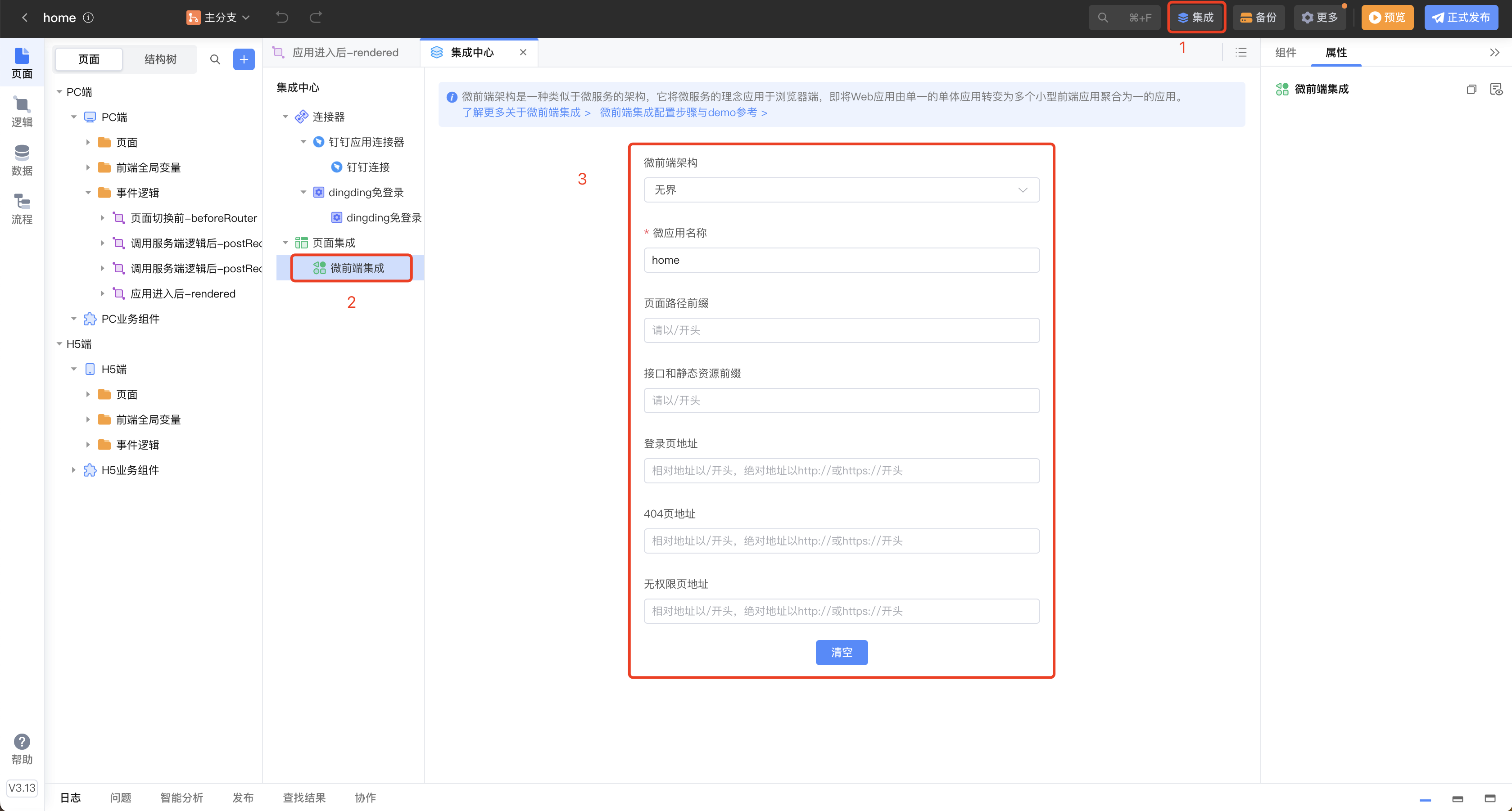
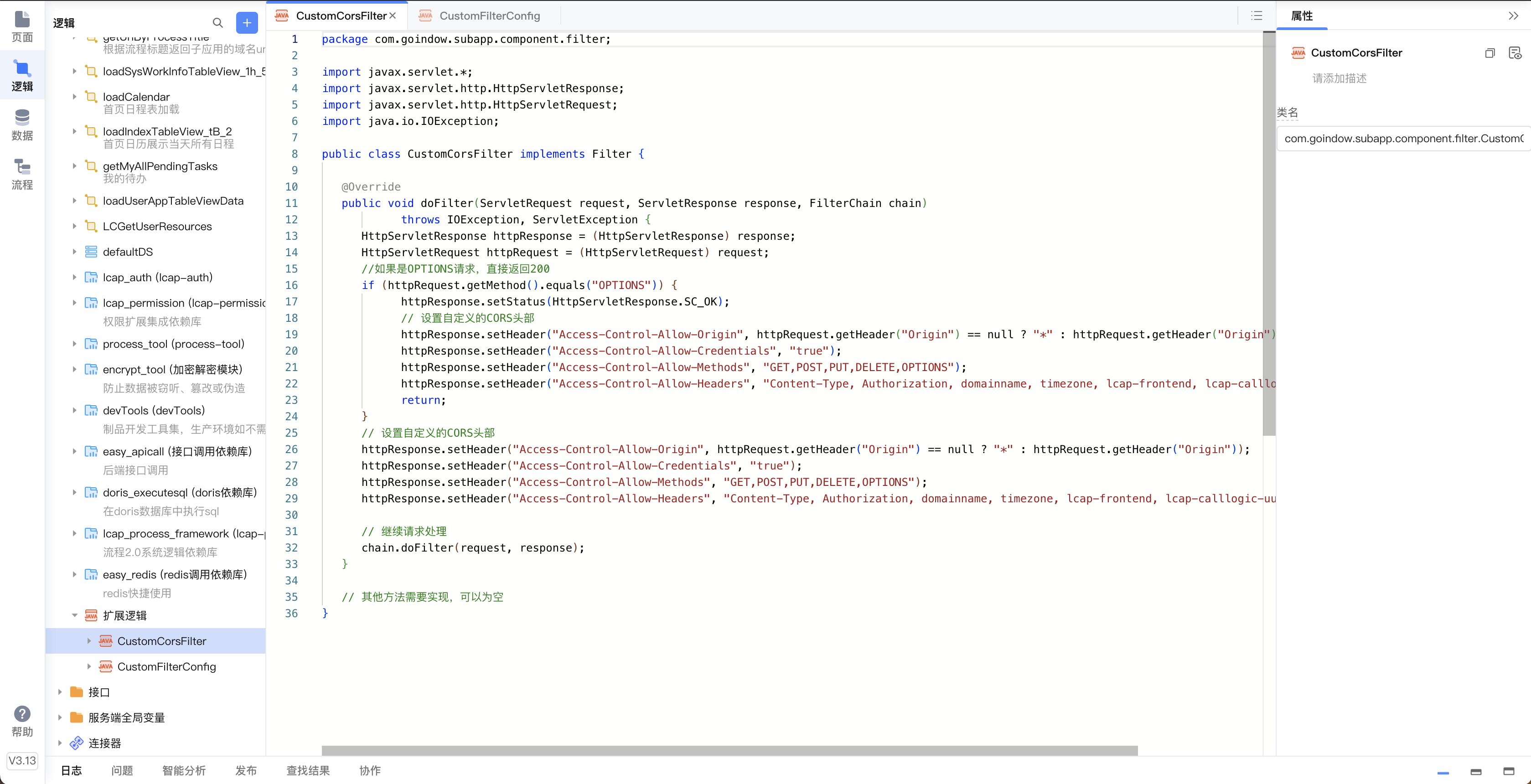
开启微前端集成
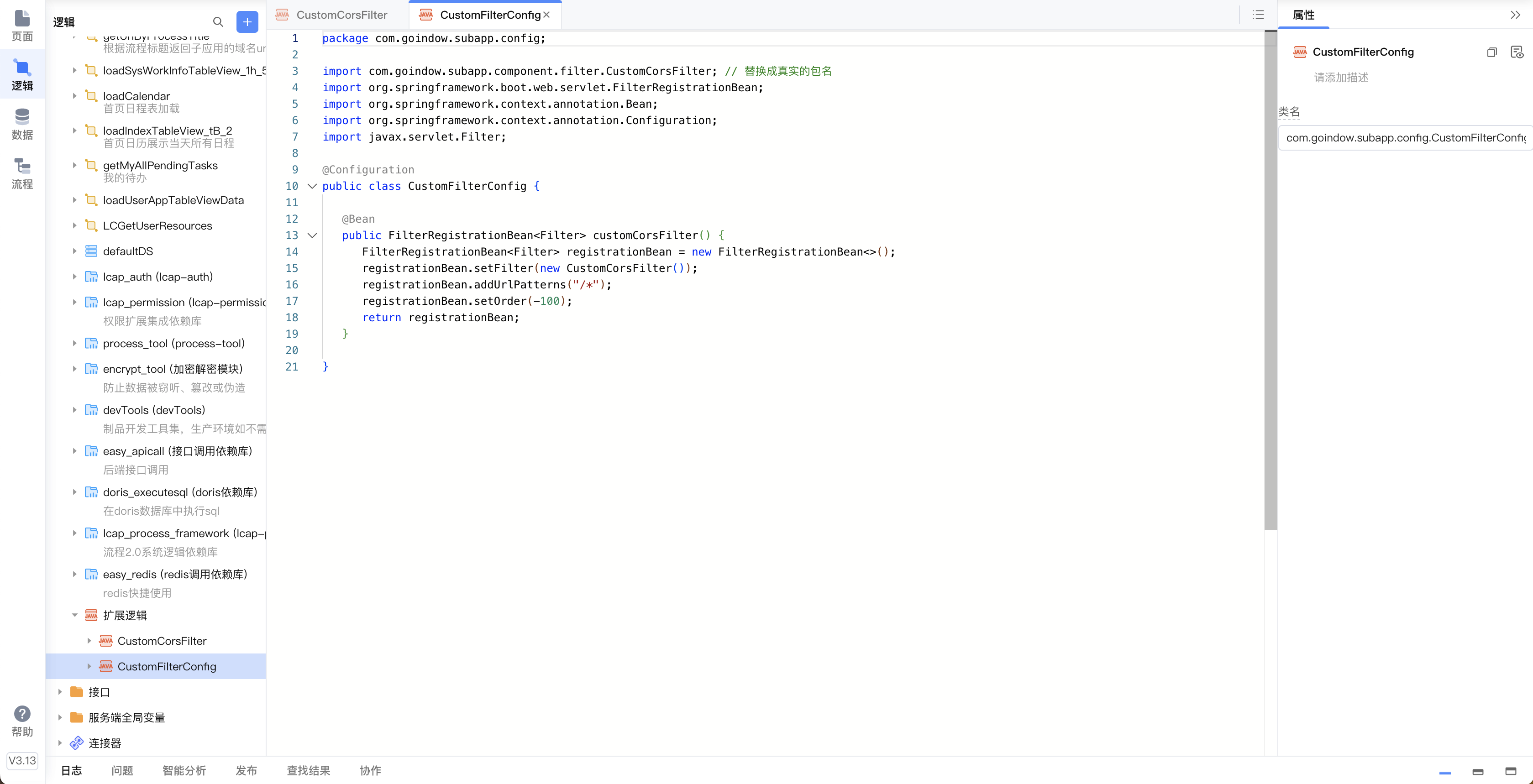
解决跨域问题
子应用 SDK 封装
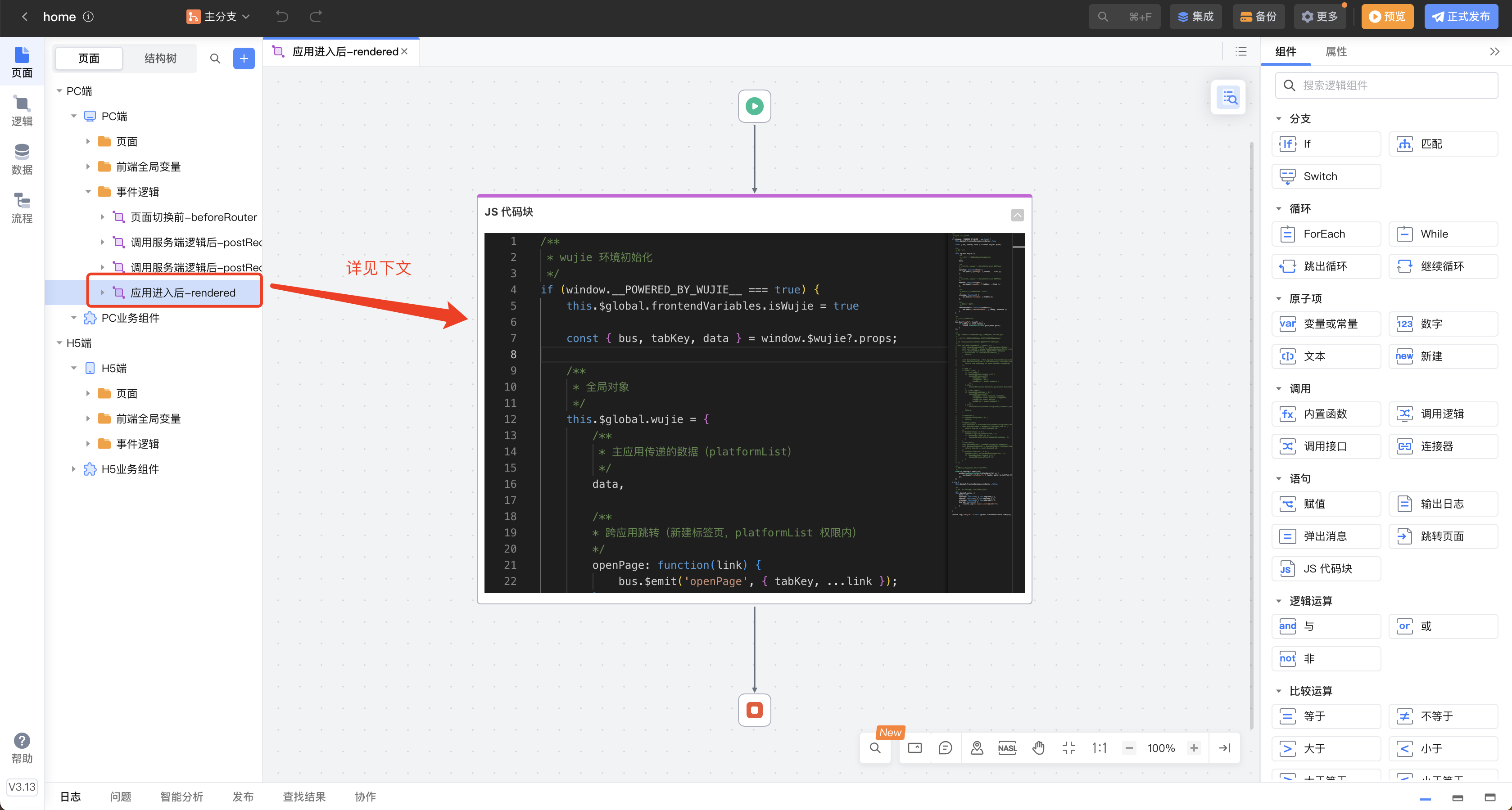
在子应用的「应用进入后」事件中引入如下 js 块,完成子应用的改造
javascript
/**
 * wujie 环境初始化
 */
if (window.__POWERED_BY_WUJIE__ === true) {
    this.$global.frontendVariables.isWujie = true

    const { bus, tabKey, data } = window.$wujie?.props;

    /**
     * 全局对象
     */
    this.$global.wujie = {
        /**
         * 主应用传递的数据(platformList)
         */
        data,

        /**
        * 跨应用跳转(新建标签页,platformList 权限内)
        */
        openPage: function(link) {
            bus.$emit('openPage', { tabKey, ...link });
        },

        /**
        * 跨应用跳转(新建标签页,platformList 权限外)
        */
        openURL: function(link) {
            bus.$emit('openURL', { tabKey, ...link });
        },

        /**
         * 子应用主动关闭(关闭标签页)
         */
        closeApp: function() {
            bus.$emit('closeApp', { tabKey });
        },

        /**
         * 子应用删除书签
         */
        removeBookmark: function(bookmark) {
            bus.$emit('removeBookmark', { tabKey, bookmark })
        }
    }

    /**
     * 主应用路径下发跳转
     */
    bus.$on("jumpTo", (event) => {
        if (tabKey == event.tabKey) {
            window.VueRouterInstance.push(event.path);
        }
    });

    /**
     * 子应用路由上报(主应用路由同步)
     */
    Promise.resolve().then(()=>{
        window.VueRouterInstance.afterEach((to) => {
            bus.$emit('routeReport', { tabKey, path: to.fullPath });
        });
    })

} else {
    this.$global.frontendVariables.isWujie = false;

    /**
     * 全局对象(非无界环境,降级兼容)
     */
    this.$global.wujie = {
        data: null,
        openPage: function() { this.degrade(); },
        openURL: function() { this.degrade(); },
        closeApp: function() { this.degrade(); },
        degrade: function() {
            console.log("非 wujie 环境,无法调用");
        }
    }

}

console.log("isWujie: " + this.$global.frontendVariables.isWujie);
子应用 SDK 供 3 个全局方法供子应用调用:
- openPage( {[platformKey], subAppKey, path, [tabName]} ),新建标签页打开链接(当前业务角色权限内)
- openURL ({url, [tabName], [platformKey], [subAppKey]} ),新建标签页打开链接(当前业务角色权限外)
- closeApp(),子应用主动关闭所在的标签页
调用如下方法,改造原有的页面跳转
javascript
// platformList 权限内(当前业务角色,权限范围内)
this.$global.wujie.openPage({
    // 应用
    subAppKey: "sds",
    // 路径
    path: "/sds/dashboard/approveStuLeave?taskId=047cf3ff-4059-11f0-ae5e-ea0828c17195&dataId=140",
    // 标签名
    tabName: "审批",
});


// platformList 权限外(当前业务角色,权限范围外)
this.$global.wujie.openURL({
    /**
     * 页面展示的平台和应用,可选,如果不传页面将不展示选中的平台和应用列表,
     * URL 可以不归属相关的平台和应用,仅表示当前 URL 是从该平台和应用打开的。
     * 如下审批页是属于「智慧学工」的,表示该审批页由「工作台-首页」进入
     */
    // 从哪个平台打开
    platformKey: "gzt",
    // 从哪个应用打开
    subAppKey: "home",
    // URL
    url: "http://dev.sds.research.lcap.lowcode.hziee.cn/sds/dashboard/approveStuLeave?taskId=047cf3ff-4059-11f0-ae5e-ea0828c17195&dataId=140",
    // 标签名
    tabName: "审批",
});

// 子应用主动关闭(关闭当前标签页)
this.$global.wujie.closeApp();
提供 1 个事件供子应用监听:
- activateTab,Tab 激活事件(不包含首次打开,在每次 Tab 切换时触发),可以用来进行数据重载
javascript
/**
 * 主应用激活标签事件监听
 */
const { bus, tabKey } = window.$wujie?.props;

bus.$on("activateTab", async (event) => {
    /**
     * 注意:
     *
     * event: { tabKey, path }
     * 1. 由于应用多开,仅处理自己的 tab 激活事件,「tabKey == event.tabKey」
     * 2. 由于事件监听写在当前页的 created 里(推荐做法),所以不需要判断 path;
     *    若事件监听写在应用的 rendered 里(不要这样用),还需判断 path,
     *    如,工作台首页需要监听的话「"/home/dashboard/Index" == event.path」
     */
    if (tabKey == event.tabKey) {
        // 激活标签时,重载「我的待办」
        await this.reloadMyPendingTasks();
    }
});
踩过的一些坑
子应用单独打开没问题,集成到主应用后出现问题!
1、选项卡关闭某个标签页,其他标签页内容错乱
选项卡组件内部 BUG,标签页没有添加唯一标识,导致组件被复用,进而乱序
说明:和 IDE 使用的前端资源包版本有关系,不一定会遇到
如遇此问题,可联系 CodeWave 官方客服替换前端资源包
2、上传组件报错跨域
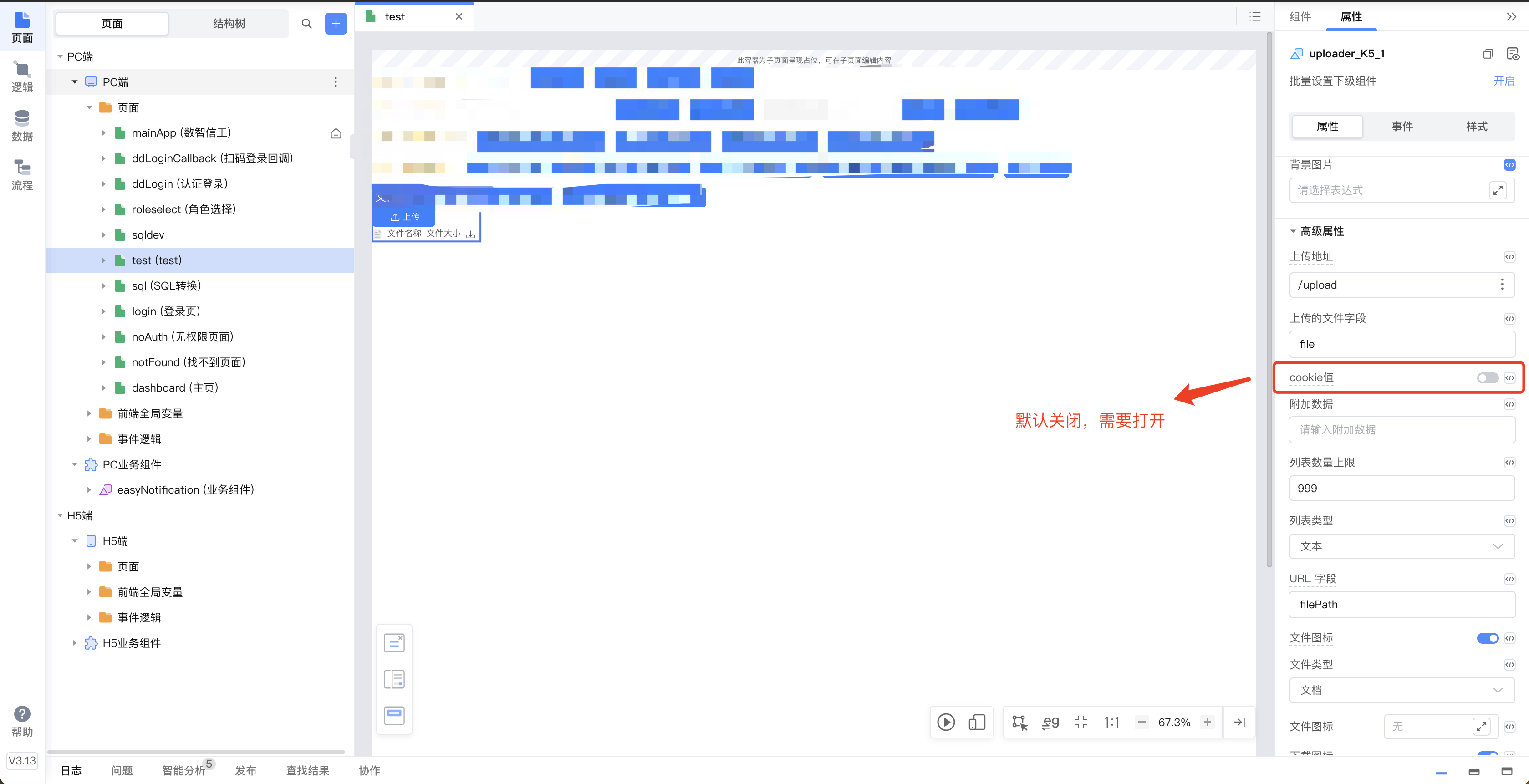
同时需配和跨域拦截器(见上文)
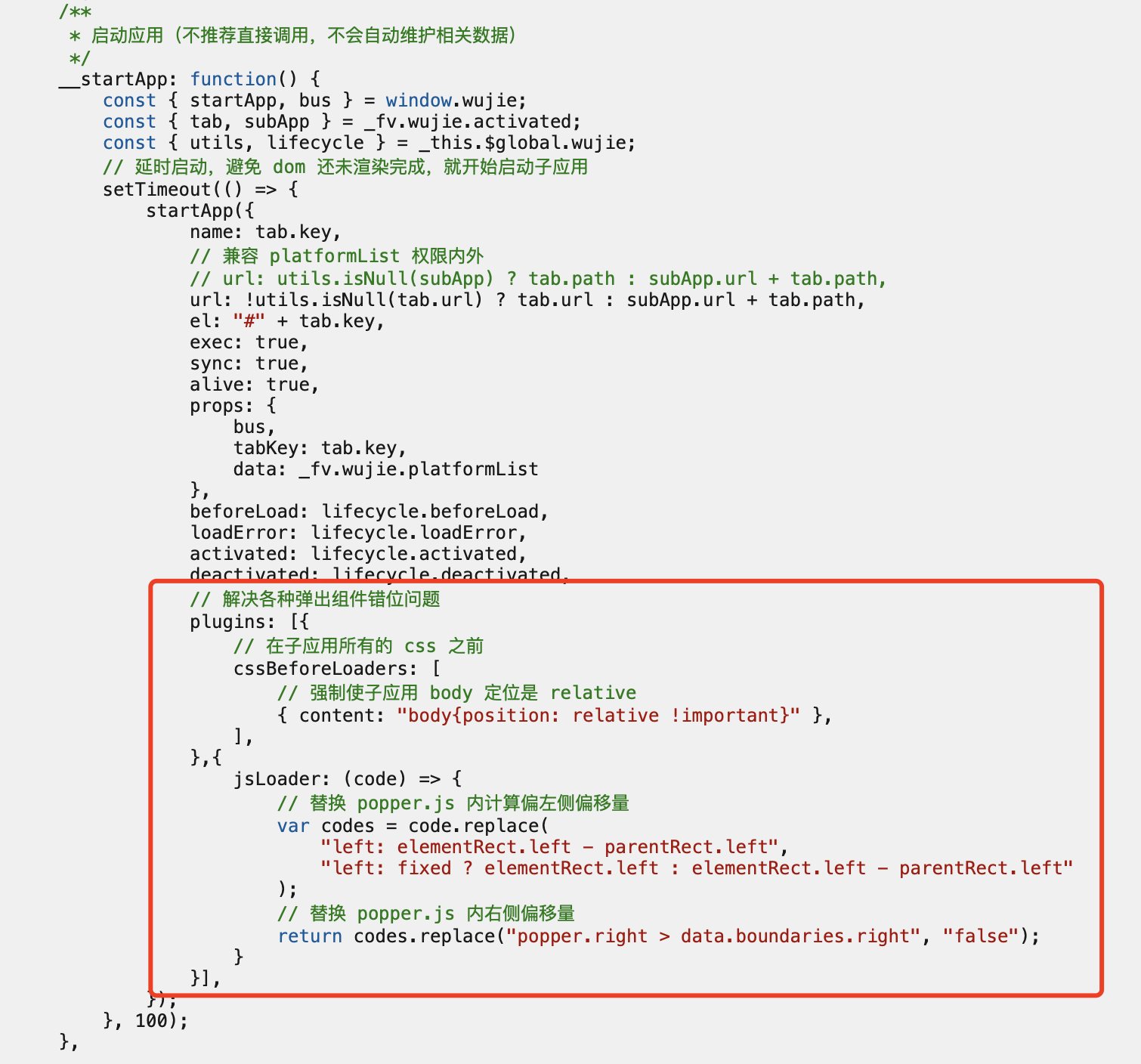
3、弹出悬浮类组件位置偏移
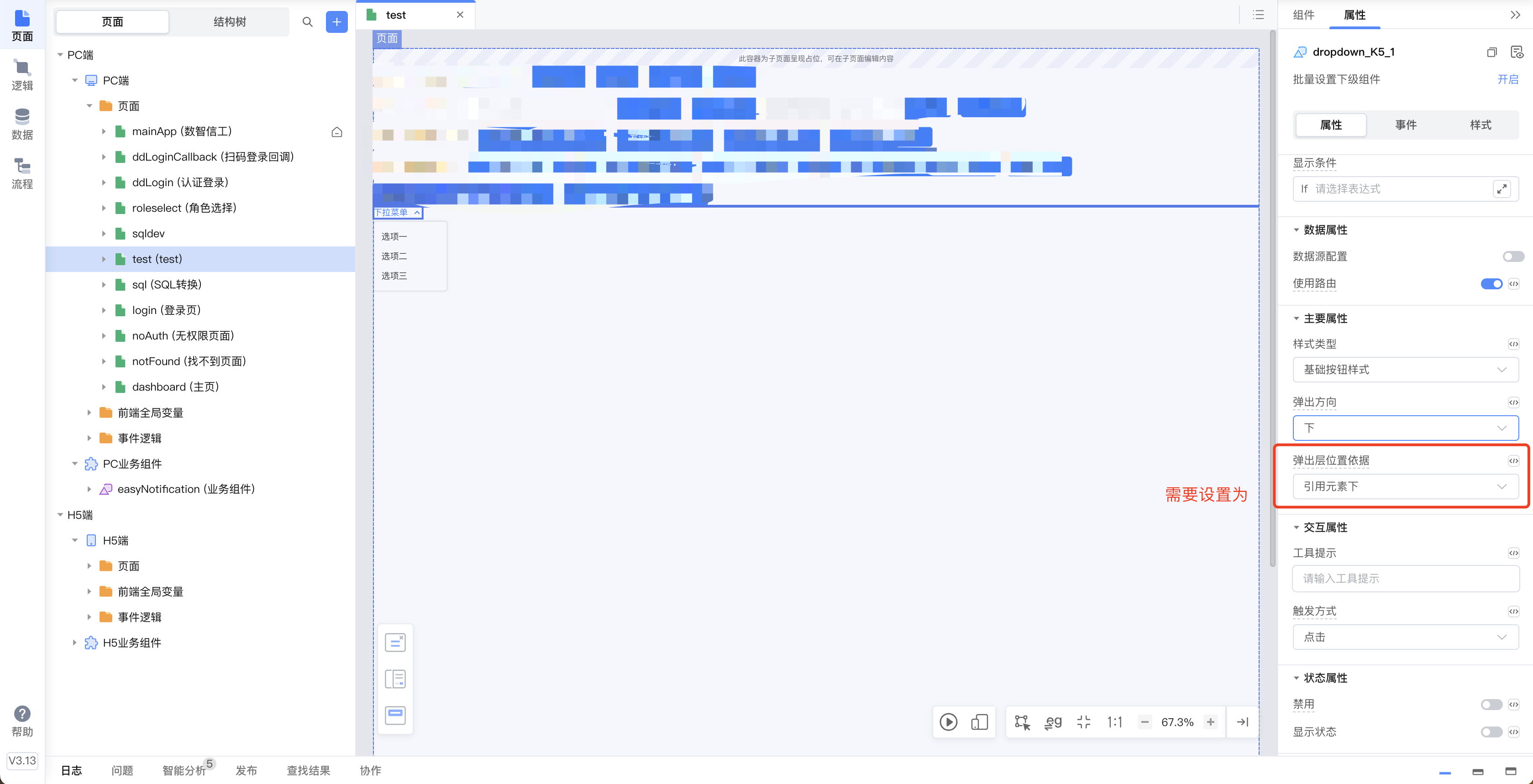
同时主应用 SDK 需要配置如下插件